Version Lifecycle
This page describes how template versions are created, how they evolve through a governed state machine, and how Bizmetry automatically determines the correct version number for each change.
Initial State
When a profile is created:
- The template starts in Draft state.
- The default version is v1.0.
Lifecycle States
| State | Description |
|---|---|
| Draft | Editable configuration state. The version is actively being worked on. |
| Ready for Review | Submitted for review. No further edits are permitted until a decision is made. |
| Rejected | Review failed. Corrections are required before resubmission. |
| Reviewed | Approved by the reviewer, but not yet officially released. |
| Published | Fully approved and immutable. Safe for promotion to higher environments. |
| Retired | Final lifecycle state. The version has been formally decommissioned and is no longer active, assignable, or referenceable within Bizmetry. |
State Transition Flow
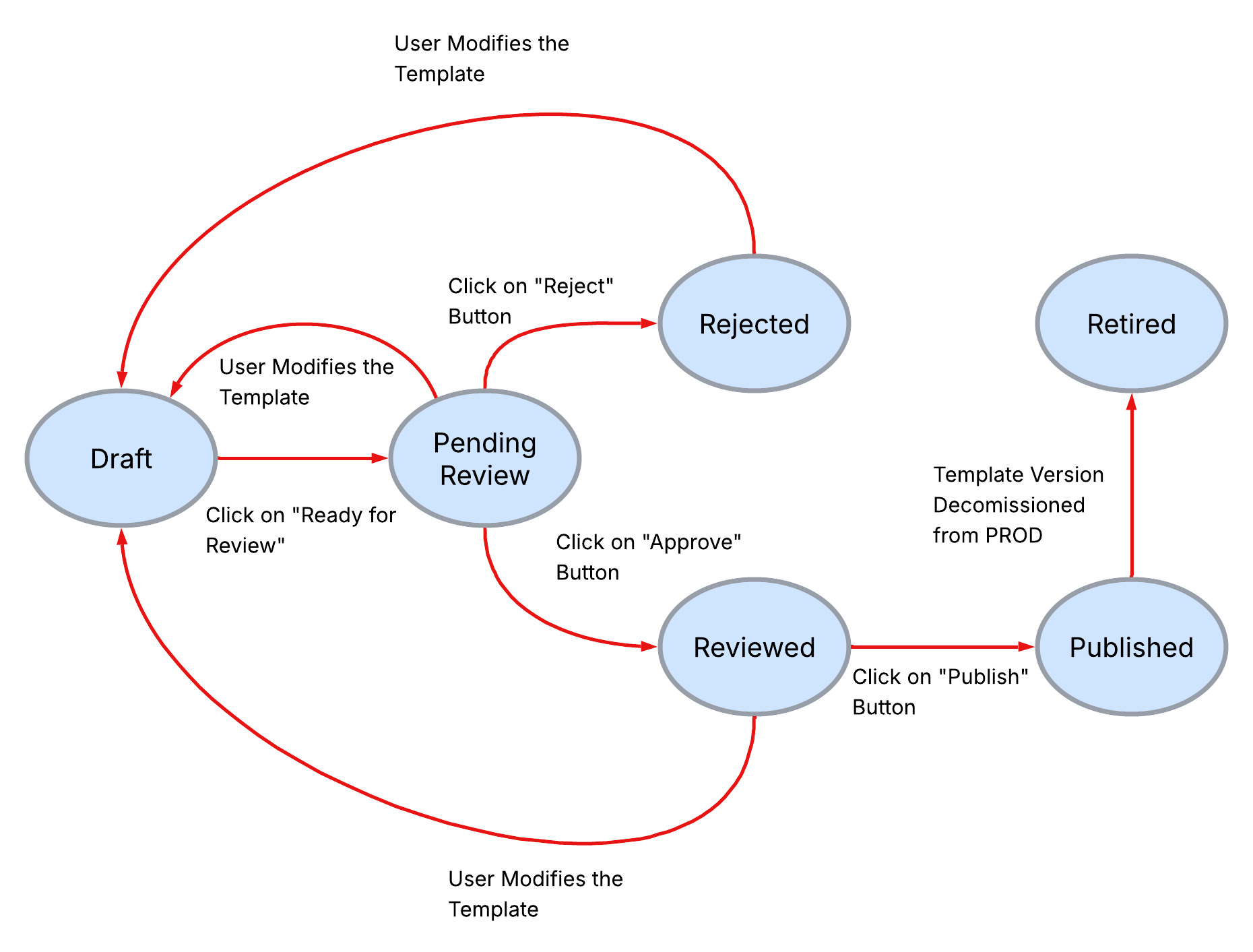
The following diagram illustrates all valid lifecycle transitions and the actions that trigger them:
| Transition | Trigger |
|---|---|
| Draft → Ready for Review | User submits the version for review. |
| Ready for Review → Rejected | Reviewer rejects the submission. |
| Ready for Review → Reviewed | Reviewer approves the submission. |
| Rejected → Draft | Version returns to editable state for corrections. |
| Reviewed → Published | Version is published, becoming immutable. Requires every API Collection linked to the version to be Published (see below). |
| Published → Retired | Version is formally decommissioned (see Retiring a Version). |
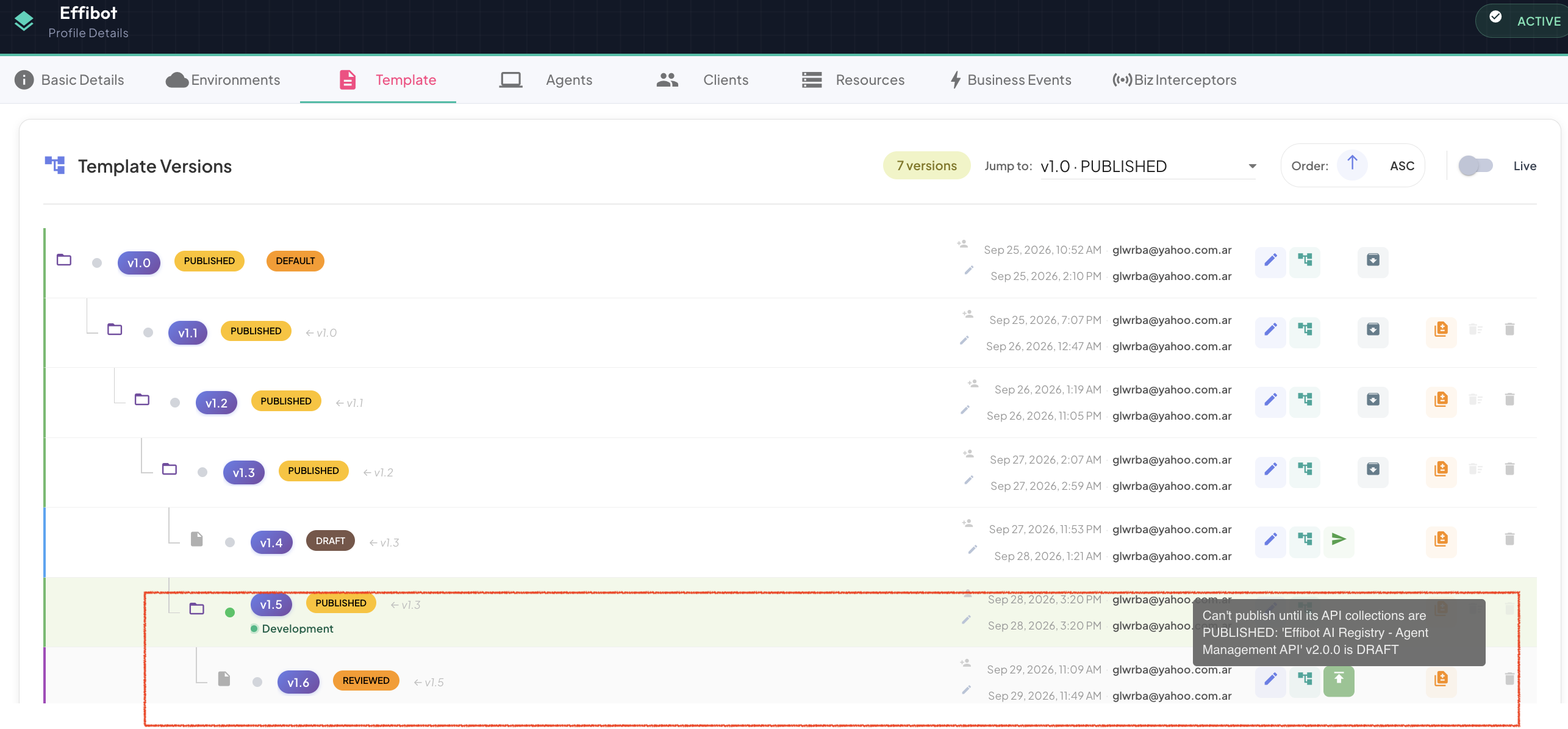
Publishing requires published API Collections
A template version can only be published when every API Collection linked to it in the API Collections tab is Published. Until then, the Publish action in the template tree is disabled, and its tooltip lists the collections that still need to be published.
Automatic Version Branching
Bizmetry automatically creates a new child version when a Published template is edited. This mechanism ensures that published versions remain immutable while still allowing continued evolution.
How it works
- A user attempts to edit a version in Published state.
- Bizmetry automatically creates a new child version, branched from the published parent.
- The child version starts in Draft state.
- The original published version remains unchanged and immutable.
- The new version is linked to its parent in the version tree.
Why this matters
- Published versions are never overwritten — they remain stable reference points.
- Multiple parallel child branches can exist simultaneously.
- Full lineage and branching history is always traceable in the tree.
Semantic Versioning
Bizmetry uses a major.minor versioning model to classify and communicate the nature of changes between versions.
Minor Version Increment
major.minor → major.minor+1
A minor version bump represents a non-breaking change, such as:
- Additions that do not alter structural compatibility
- Attribute refinements
- Non-disruptive configuration updates
- Backward-compatible enhancements
Minor changes do not require structural revalidation across environments, but still follow the full review lifecycle before publishing.
Major Version Increment
major.minor → major+1.0
A major version bump represents a breaking structural change, such as:
- Modifications to ASBO structure
- Changes affecting relationships between entities
- Removal of structural components
- Incompatible schema adjustments
Major changes require a full review cycle and careful validation before being promoted across environments.
Automatic Version Bump Policy
Bizmetry automatically determines whether a change results in a minor or major version increment. The bump is calculated based on:
- The number of changes
- The type of changes involved
- Whether the modifications are structurally breaking or non-breaking
This evaluation is performed automatically by Bizmetry at save time.
Note
Version numbers cannot be manually modified.
This automatic policy ensures:
- Consistent semantic versioning across all profiles
- Objective, rule-based classification of changes
- Prevention of manual version manipulation
- Reliable governance across the template evolution lifecycle