API Collections and Lifecycle Management
API Collections hold the Swagger / OpenAPI contracts of the applications BizMetry observes. They are the event sources of Business Events: every Business Event is built on operations taken from an API Collection.
Applications don't stand still, and neither do their contracts. BizMetry keeps the business model and the API contracts in step by linking specific API Collection versions to specific template versions.
API Collections Belong to Template Versions
Each template version declares the API Collection versions it works with. You set them in the API Collections tab of the template editor.
That link decides what Business Events can use:
- A template version can be linked to one or more API Collections.
- For each API Collection, a template version is linked to exactly one version of it. A Business Event never mixes operations from two versions of the same API.
- When you create a Business Event with the Business Event wizard, the template version you select determines which API Collections, and so which API operations, are available. Only those operations can be selected, and only they appear in the Biz Event Composer when you configure the mappings.
- Only template versions with at least one linked API Collection can be selected in the wizard.
flowchart LR
    T15["Template v1.5"] --> A200["Agent Management API v2.0.0"]
    T16["Template v1.6"] --> A210["Agent Management API v2.1.0"]
    T16 --> P100["Agent Provider API v1.0.0"]
    A200 -.-> BE1["Business Events built on v1.5"]
    A210 -.-> BE2["Business Events built on v1.6"]
    P100 -.-> BE2
One Collection, Many Versions
An API Collection evolves with its application: every new contract produces a new version of the collection (v1.0.0, v1.1.0, v2.0.0, …). Several of those versions are usually in use at the same time, because each environment of the release pipeline (DEV, IST, QA, UAT, PROD, …) runs whatever version of the application has been deployed to it.
The API Collections dialog shows each collection as a tree: every version hangs under the version it was derived from.
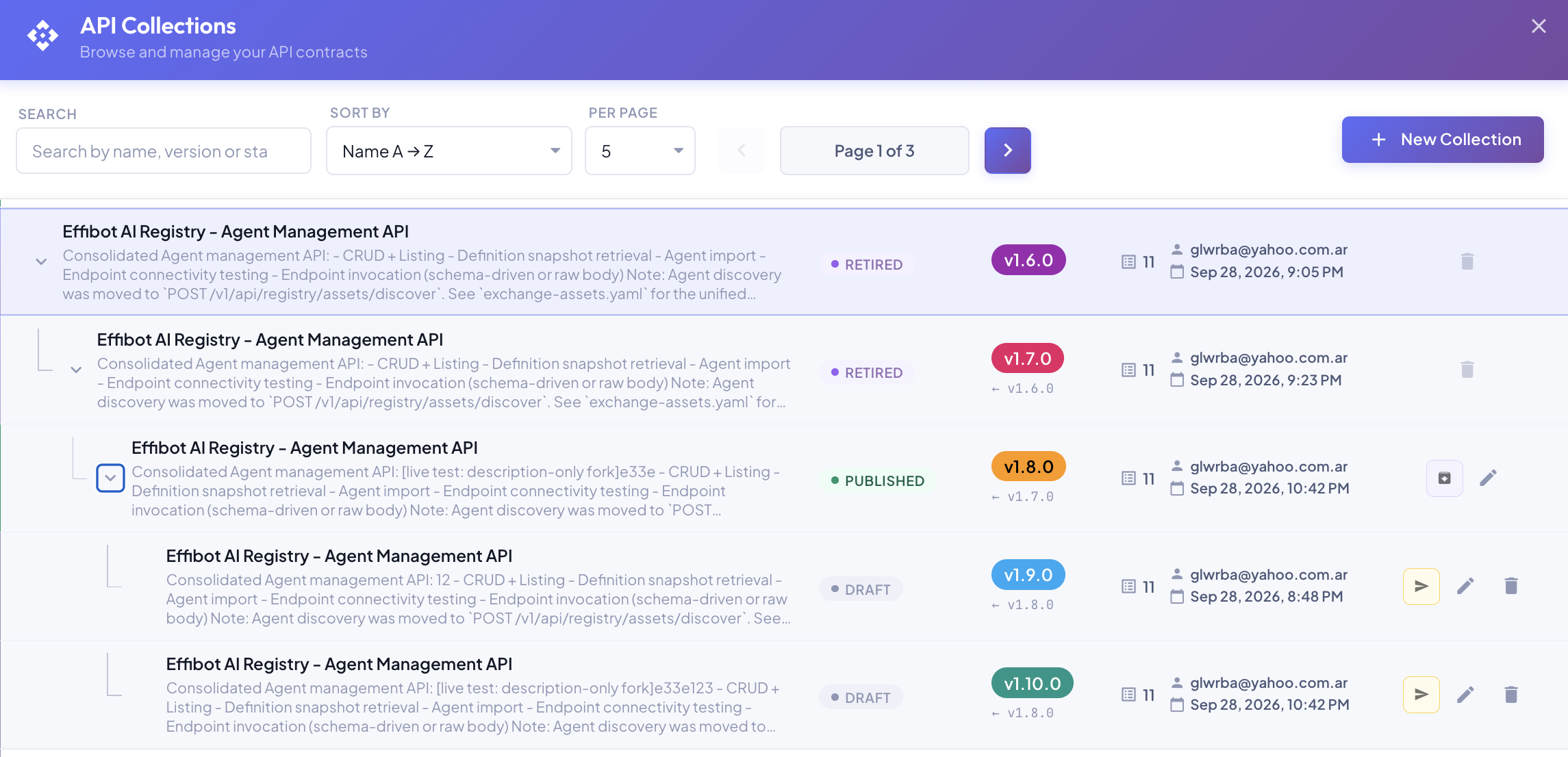
Because each environment is assigned a template version, and each template version is linked to its own API Collection versions, every environment uses exactly the contract its application exposes:
| Environment | Application release | Template version | Agent Management API |
|---|---|---|---|
| DEV | 2.1 | v1.6 | v2.1.0 |
| QA | 2.0 | v1.5 | v2.0.0 |
| PROD | 2.0 | v1.5 | v2.0.0 |
Evolving with the Contract
When an application changes its Swagger contract, the BizMetry model moves forward with it through the normal template release cycle:
- The API Collection gets a new version with the new contract (see Tracking API Swagger Version Bumps).
- The template is forked into a new version. Its API Collections tab is updated to link the new collection version.
- The new template version is published and assigned to the environment where the new application release runs.
- Business Events for that environment are forked onto the new template version, and moved automatically to its new API Collection versions.
Older template versions keep their links to older collection versions, so environments that haven't received the new application release keep working unchanged. The BizMetry model advances at the same pace as the applications' Swagger contracts, one template release at a time.
Lifecycle Rules
Template versions and API Collection versions have independent lifecycles, tied together by a few rules.
Links can change until the template is published
While a template version is in any state before Published (Draft, Ready for Review, Rejected, Reviewed), you can freely add, remove or change the API Collection versions it's linked to, and those collection versions can be in any state except Retired.
A Published template version is immutable, and so are its links. Changing the API Collections of a published template from the template editor creates a new template version in Draft, like any other change to a published template.
Publishing a template requires published API Collections
A template version can only move to Published when every API Collection version linked to it is Published. Otherwise BizMetry keeps the template from advancing:
- The Publish action in the template tree is disabled, and its tooltip lists the collections that are not published yet.
- The API Collections tab of the template editor shows a warning banner with the same information.
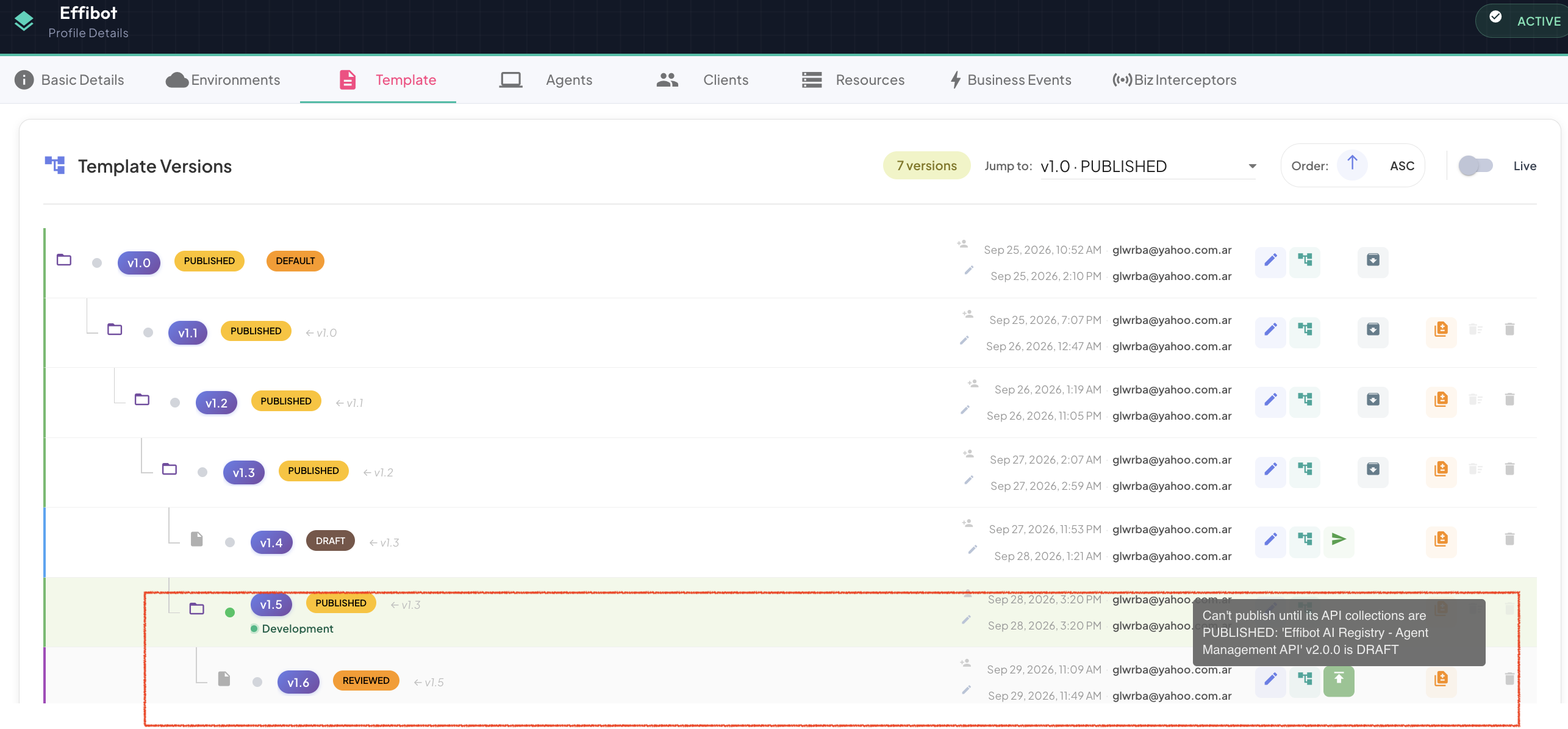
Publish the pending API Collection versions first, then publish the template.
What this means for Business Events
A Business Event can only be published once its template version is published (see Biz Event Lifecycle Management). Since a published template always has published API Collections, a published Business Event always relies on stable, immutable contracts.
Collections in use are protected
An API Collection version linked to a template version can't be deleted, and it can't be retired while any non-retired template version still uses it. Remove it from those templates, or retire the templates, first.