Environment Assignment Rules
These rules apply to direct edits, version actions, drag and drop, and rolling operations.
The version control buttons and drag & drop operations enforce a set of rules that ensure consistent and ordered template deployment throughout the release pipeline:
-
Descending version order: If environment A1 precedes environment A2 in the workflow, then
V(A1) ≥ V(A2), where V is the associated template version. This enforces a FIFO release model — newer versions enter the pipeline from the left (lower environments) and propagate toward production (right) until they are eventually decommissioned. -
Automatic deprecation on production promotion: When a template version is promoted into the
PRODUCTIONenvironment, the version it replaces is automatically marked asDEPRECATED, as it has completed its lifecycle and can be safely retired. -
DRAFT templates are restricted to DEVELOPMENT: Only
DEVELOPMENTenvironments may hold template versions in a non-published state (e.g.,DRAFT). All other environments must be associated exclusively with stable, approved (PUBLISHED) template versions, ensuring that only validated templates reach higher environments. -
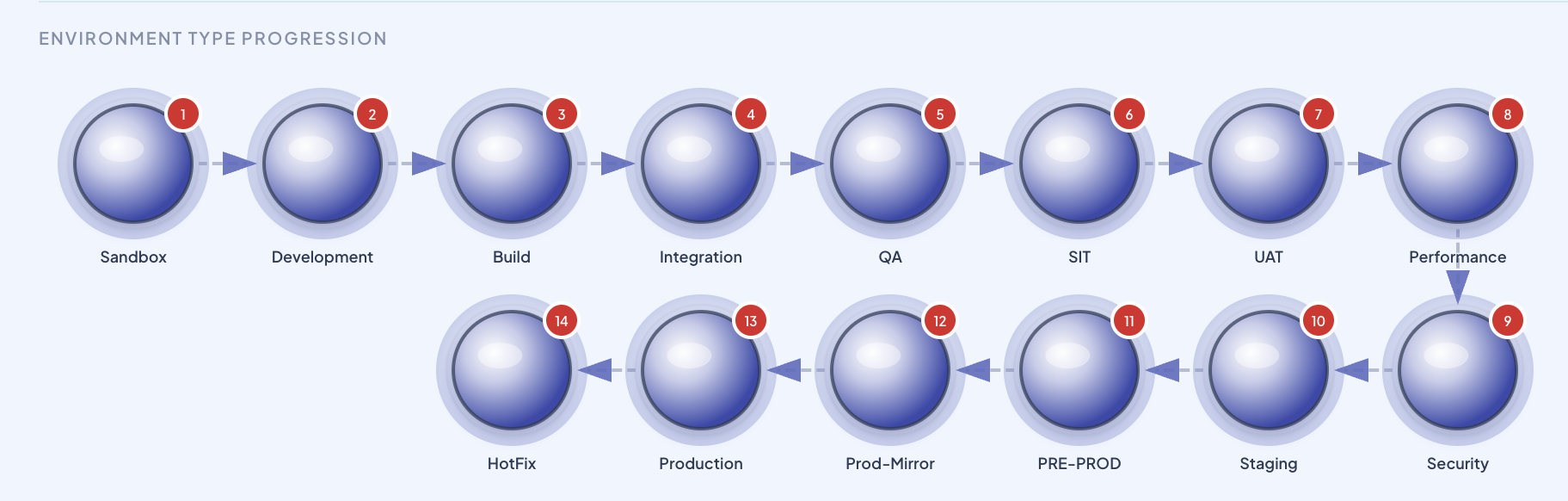
Master environment type ordering: The position of environments within the pipeline is not arbitrary. BizMetry enforces a standard master sequence that defines the valid ordering of environment types. You must accommodate your use case within this hierarchy — environments cannot be placed in positions that contradict this standard progression. The master sequence is shown below:
Tip
As a visual aid, this same master sequence is also displayed at the bottom of the pipeline editor whenever Edit Mode is active.
Data reconciliation and agent availability
Lifecycle and ordering checks do not replace connectivity checks. A destination that restores a mapped attribute, anchor or ASBO can require a datasource pull. When imported resources need re-reading, the agent must be ONLINE and REACHABLE. See preflight checks for blocked saves and workflow rejection examples.