Understanding Interceptor Topology
A Biz Interceptor sits at the very edge of BizMetry's observability model — embedded directly inside a business application, wherever that application actually runs: a public cloud, a private VPC, or a customer's own on-premise infrastructure. This page covers where an interceptor sits relative to the application it instruments, the customer's Agent, and the BizMetry platform, and why that placement is what makes BizMetry's business telemetry capture scale the way it does.
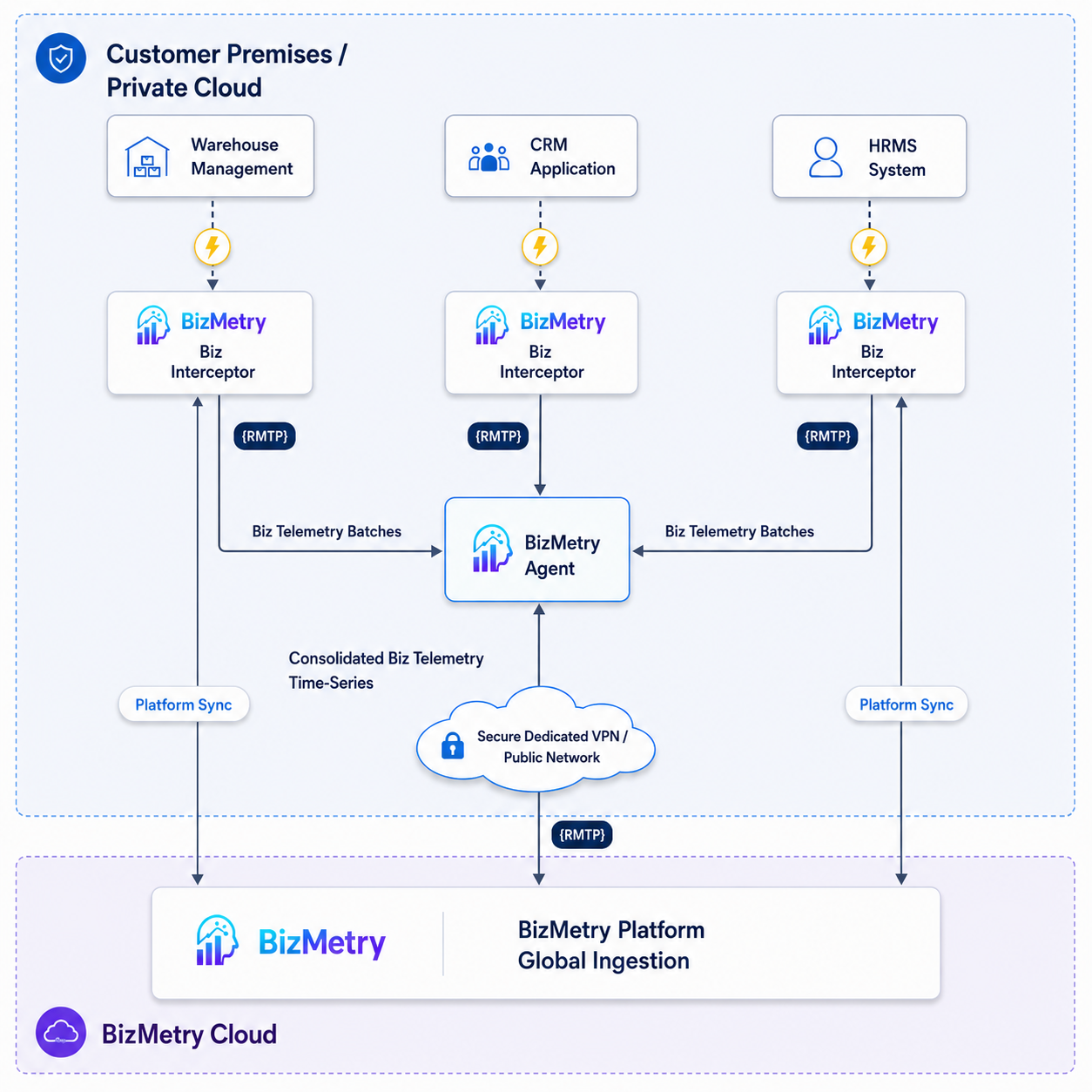
Listening at the Source
Whether configured for automatic or manual instrumentation, an interceptor's job starts at the traffic itself: it listens to the application's own request/response traffic, intercepts the operations that matter, and turns them into business telemetry — without waiting for that traffic to reach some downstream collector. Capture happens as close to the business application as it's possible to get, at the exact moment the traffic occurs.
Transparent to the Application
An interceptor is a passive, embedded observer, not a component the application has to actively integrate against (beyond the one-time deployment step covered in Downloading a Biz Interceptor). It manages instrumentation on its own — listening, capturing, buffering, batching, transmitting — without the business application needing any awareness that it's there. In Automatic mode this is fully invisible; even in Manual mode, where a developer explicitly calls the SDK to generate specific frames, everything around those calls (buffering, sync, transmission) still runs transparently to the rest of the application.
Two Independent Communication Paths
Every interceptor instance talks outward over two separate channels, each serving a different purpose:
| Path | Talks to | Carries | Purpose |
|---|---|---|---|
| Platform Sync | The BizMetry platform, directly | Lightweight heartbeats and status/configuration | Keeps the platform continuously up to date with this interceptor's own state — see Understanding Interceptor Synchronization for the full heartbeat/sync cycle. |
| Agent Upload | The Agent deployed in the customer's own infrastructure | The actual captured business telemetry, as batches | Moves the bulk of the data — the frames themselves — off the interceptor and into the customer's environment, without leaving that environment's boundary until the Agent forwards it onward. |
These two paths run independently of each other. A momentary interruption to the batch upload path doesn't affect the platform's ability to see the interceptor is alive; the interceptor keeps buffering and simply catches up on the next successful cycle once the Agent is reachable again.
A Decentralized, Ubiquitous Capture Layer
Because an interceptor can be embedded inside any business application, in any environment, on any infrastructure the customer already runs, it gives BizMetry's business instrumentation an effectively ubiquitous reach — capture, buffering, and transmission of business telemetry all happen right next to the applications generating it, rather than requiring traffic to be routed to some central collection point first. Each interceptor manages its own slice of that capture independently; the Agent in each environment is what consolidates its environment's interceptors into one stream, and the platform is what consolidates every environment, across every Profile, into the account-wide view. Decentralized at the edge, unified once it reaches the platform.
Built on BizMetry's Native RMTP Protocol
Every interceptor communicates over BizMetry's own native protocol — RMTP (Real-Time Application Monitoring Protocol) — purpose-built rather than layered on a general-purpose transport. RMTP is designed to keep network latency low and throughput high under any workload shape an instrumented application might produce, from a lightly-used DEV environment generating a trickle of traffic to a PROD environment under sustained, heavy real-time load. The same protocol handles both ends without needing to be swapped out as traffic patterns change.
Tunable to Each Application's Workload
Because different business applications genuinely see different traffic shapes, an interceptor's behavior isn't fixed — it exposes a set of configurable parameters (buffering, batching, sync and heartbeat intervals, and more) tuned per environment on Step 3 — Tuning or the Edit dialog's Tuning tab. This is what lets the same interceptor model serve a quiet DEV environment and a high-throughput PROD environment equally well, each configured to match its own actual workload rather than a one-size-fits-all default. On top of that static configuration, each running instance's own backpressure auto-tuner continuously adjusts worker count and batch size on the fly, within configured bounds, so a sudden demand spike doesn't require a manual reconfiguration to ride out.