Downloading a Biz Interceptor
Click the icon on any row of the Biz Interceptor Summary to open the Interceptor Download dialog.
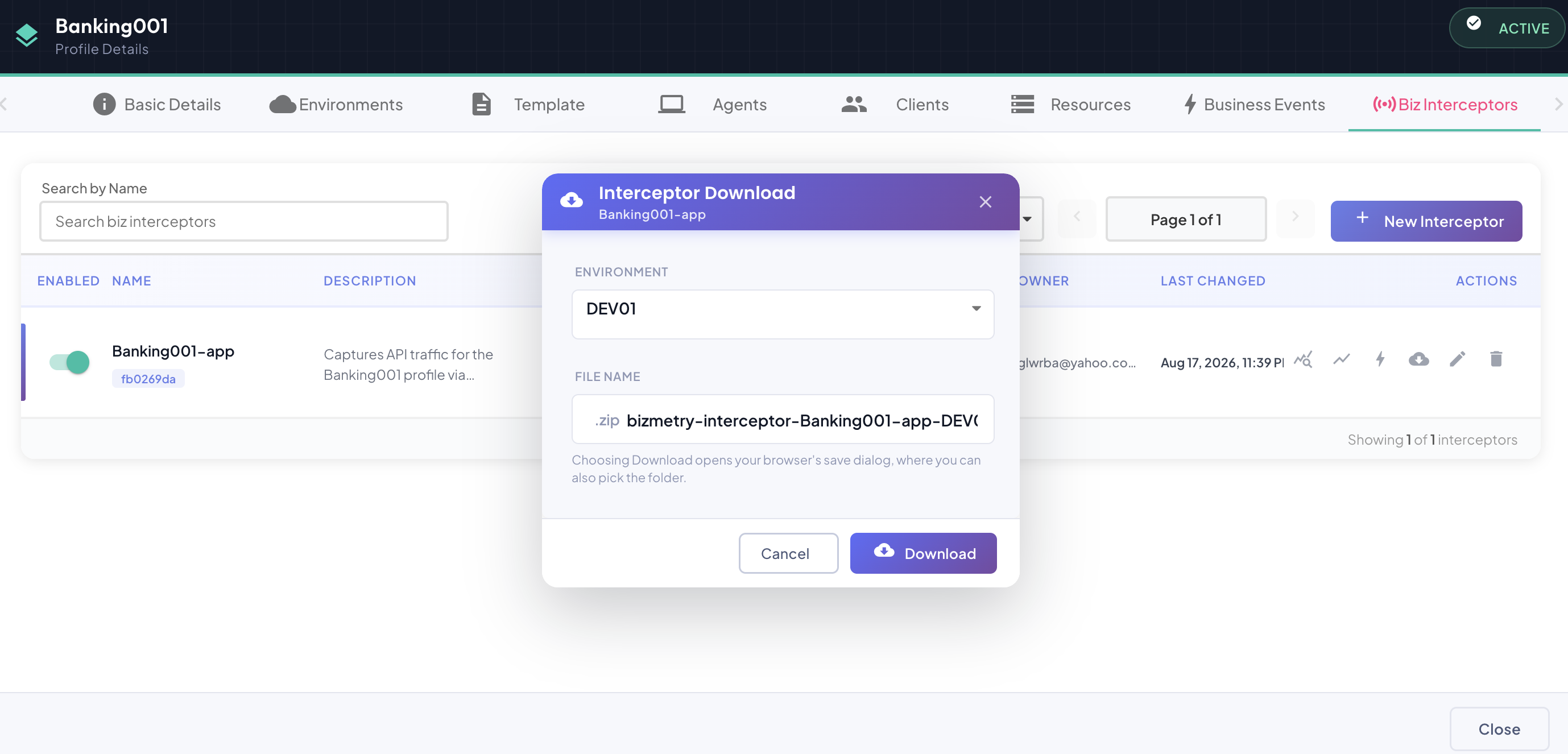
Choosing an Environment and File Name
Select which Environment to download the artifact for — the download is always scoped to one environment at a time, since each environment carries its own credentials and Agent certificate baked in (see What's Inside below).
File Name is pre-filled with a systematic default (bizmetry-interceptor-<interceptor name>-<environment name>-<UTC timestamp>) and is fully editable. The .zip extension is fixed and appended automatically.
Not every Interceptor Type has a downloadable artifact yet
The download is only available for interceptor types that already have a publishable build — today that's Java Native only. Attempting to download for any other Interceptor Type (Envoy Proxy, Kong, an API Gateway type, etc.) fails with an error, since there's nothing yet configured for the platform to package. This is a rollout-in-progress limitation, not a configuration mistake on your end — the interceptor itself is created and configured correctly either way, it just can't be deployed anywhere until its type has a real artifact.
Downloading
Click Download to fetch and package the artifact. This can take a few seconds — the platform repackages the SDK on demand rather than serving a static file — so the button switches to a spinner state ("Downloading…") for the duration instead of appearing to do nothing.
Where your browser supports it (Chrome, Edge, and other Chromium-based browsers), clicking Download opens a native Save As dialog first, letting you pick the destination folder before the download even starts — cancelling that picker wastes no network traffic. On browsers without that capability (Firefox, Safari), the file saves straight to your browser's default downloads folder instead.
What's Inside
The downloaded .zip contains the interceptor SDK artifact for the environment you selected, with two things already embedded inside it:
bizmetry-interceptor.properties— this environment's connection configuration (platform URL, service-account credentials) with the credentials obfuscated, not plaintext. The library reverses the obfuscation locally at startup using the interceptor's own ID as the key — this isn't a real security boundary (the key travels in the same file), just protection against casual/incidental exposure if the file is stored, screenshotted, or accidentally committed somewhere it shouldn't be.- The environment's Agent certificate — so the interceptor can establish a trusted connection to its Agent (for both
/heartbeatchecks and traffic upload) without any additional certificate setup on your part.
One artifact per environment
Because credentials and the Agent certificate are environment-specific, a fresh download is required for each environment you deploy to — the same .zip can't be reused across DEV, SIT, and PROD.
For Automatic instrumentation, this artifact is what gets deployed into your infrastructure to run against the configured API Gateway. For Manual instrumentation, it's the SDK dependency you drop into your application's own build — add it to your classpath (Java Native) or environment (Python Native) and the library picks up bizmetry-interceptor.properties automatically at startup.
After Downloading
The interceptor implements instrumentation internally to the process it runs in — once integrated, all inbound and outbound traffic of the business application passes through the interceptor's own filter first, before it decides what actually gets forwarded to the local Agent for analysis on the BizMetry platform. Only the operations that end up appearing in Live Endpoints are the ones actually intercepted and sent — everything else is simply logged locally and discarded, never leaving the application.
At Build Time
What's needed to actually integrate the artifact into your business application depends on the interceptor type you're deploying. For Java Native specifically, the downloaded artifact is a JAR — two common ways to bring it in:
- Install it as a library into your own artifact repository (e.g. Nexus), then reference it as a normal dependency from your application's
pom.xmlso it's picked up automatically at build time along with its own dependencies. - Or, more simply, copy the JAR directly into your application's
/libfolder and let the JVM pick it up as part of its classpath — no build-system changes needed.
Match the interceptor's JVM version to your application's
BizMetry provides separate Java Native interceptor builds for different JVM versions, primarily targeting HotSpot (Oracle) across several major versions. The interceptor's JVM version and your application's own runtime JVM version must match — if they don't, the interceptor won't initialize correctly. Double-check this before deploying, especially after a JVM upgrade on the application side.
At Runtime
Once running, the interceptor has to establish two separate network connections, in order, and each has its own configuration to get right beforehand:
- To the BizMetry platform itself — the interceptor authenticates against the platform first, so it needs outbound internet access. If that access has to go through a corporate proxy, configure it once for the environment on its Agent, under Tuning — Network: every interceptor of that environment then uses it.
- To the environment's Agent, via the Agent's own internal URL — reached only after the platform authentication above succeeds. This requires the Agent itself to have its Security Internal configuration set up correctly, exposing the internal URL your private network can actually reach it at.
Check both network boundaries, and that the Agent is actually running
Confirm neither network boundary — the outbound path to the BizMetry platform, nor the internal path to the Agent — has a firewall silently blocking it. Loop in your network/infrastructure team to guarantee both stay reachable; connectivity problems here are one of the most common causes of an interceptor that never comes Online. Also confirm the environment's Agent itself is up and running from the BizMetry console before assuming the interceptor is at fault.
The two connections fail differently, and it's worth knowing which symptom points at which problem:
- Can't reach the platform — the interceptor never authenticates, so it never transitions to Online; the environment simply shows Offline in the console indefinitely, with no further detail beyond "no heartbeat."
- Authenticates, but can't reach its Agent — the interceptor is up and heartbeating, but has nowhere to actually send its telemetry batches. Pressure climbs steadily as the buffer fills with everything that can't be synced out, and once it hits 100% the interceptor can no longer accept new traffic at all — newly-captured frames start getting dropped instead of buffered. Dropped traffic is business telemetry that's permanently lost, not just delayed, and it degrades the precision of every downstream KPI and dashboard calculation built on it — this is a situation worth actively monitoring for and avoiding, not something to let self-resolve.