Versioning & Fork-on-Bump
Business Events in BizMetry are versioned entities. Each time you need to change an event's configuration — either proactively (new business requirements) or reactively (a Template version bump) — a new version is created. The old version continues to capture telemetry uninterrupted until the new one is published.
Why Versioning Exists
A Business Event's mapping depends directly on the Frame Type structure defined in the Template. When a Template version is bumped (new components added, existing ones renamed or restructured), the field mappings in active Business Events may become stale or incorrect.
BizMetry handles this through fork-on-edit and fork-on-bump: a PUBLISHED version is never edited in place — any change, whether made by you or triggered automatically by a Template bump, creates a new version instead, giving you time to fix or adjust mappings before publishing it.
Version Numbering
Every Business Event's first version is always 1.0, created in DRAFT. From there, editing a PUBLISHED version automatically forks a new version — you never choose the number yourself; BizMetry calculates it based on the scope of the change:
| Change | Bump |
|---|---|
| Target Frame Type + Version changes (i.e. re-pointed to a different Template version) | Major — +1.0 |
| Frame Type changed, Version unchanged | Minor — +0.3 |
| Operations added or removed | Minor — +0.2 |
| Mapping added/removed, BMEL edit, filter/correlation edit (default) | Minor — +0.1 |
Only the largest applicable step is used per save — steps are not additive. The result is also collision-safe: it's always calculated against the highest version number that already exists for that Business Event, so re-forking after deletions never produces a duplicate.
See Lifecycle & States → Versioning for the full rule reference.
Creating a New Version by Editing
There's no separate "New Version" or "Bump Version" button. To create a new version of a PUBLISHED Business Event, simply edit it:
- In the Business Events tab, find the
PUBLISHEDversion you want to change. - Click Edit (or Edit Mappings, if you only need to touch the field mapping) — see Managing Versions.
- BizMetry forks a new
DRAFTversion, copying all existing mappings, operations, and configuration from thePUBLISHEDversion, and automatically assigns its version number per the bump rules above. - Make your changes in the
DRAFT. - Submit it for review and, once approved, Publish it.
The original PUBLISHED version is untouched and keeps capturing telemetry throughout this whole process.
Existing DRAFT blocks a new fork
If a DRAFT version already exists for the event, you can't create another one until you publish, submit, or delete the existing DRAFT.
Automatic Fork-on-Bump
This is triggered from the Template Release Manager, in an environment's Profile settings: when you edit a PUBLISHED Template and then assign the new version to an environment, BizMetry runs a reconciliation pass — the same pass that also fixes up affected Resources and Clients — and, as part of it, forks every affected Business Event automatically. You don't run this yourself; it's a side effect of assigning the Template.
Where this runs
This whole process is executed by Bizmetry at the moment the Template is (re)assigned to the environment — during the conciliation process.
Two guards decide whether a fork happens at all
Not every template reassignment triggers a fork. Before touching any Business Event, BizMetry checks:
| Guard | Rule | If it fails |
|---|---|---|
| 1 — Direct lineage only | The new Template instance must be a direct child of the old one . | Fork is skipped entirely. Assigning a Template from a different branch, or jumping non-linearly across versions, doesn't propagate Business Events — the tree relationship is different, so there's nothing safe to inherit from. |
| 2 — No fork on downgrade | The new Template version must not be lower (semver-wise) than the old one. | Fork is skipped. A downgrade is treated as a deliberate rollback — the existing PUBLISHED Business Events targeting the old (still valid) Template version are left exactly as they are. |
If either guard fails, the affected Business Events are untouched — no new DRAFT, no DEPRECATED transition. This is silent from the UI's perspective: the Template reassignment itself still succeeds (Resources/Clients are still reconciled), only the Business Event fork step is skipped.
When both guards pass
For every PUBLISHED Business Event version targeting the old Template instance:
-
Per-mapping classification. Each existing field mapping is checked against the new Template's definition of the same target component:
Outcome Meaning Stable The target component still exists with an identical definition (same type/constraints, same referenced Resource Type + Attribute, same Nested Table column) → the mapping is kept exactly as-is. Unstable The component still exists but its definition changed (renamed field, changed constraints, re-pointed reference, etc.) → resolved automatically via IntelliSense (see below). Eliminated The component no longer exists anywhere in the new Template → the mapping is dropped. New The new Template's Frame Type has components the old mapping never covered (fields added since the parent version) → IntelliSense is also asked to try mapping these, not just the broken ones. What \"stable\" means, per component type
- CUSTOM — same scalar type and the same constraints (max length/regex for strings, bounds for numbers, enum values for enums).
- OBJECT_REFERENCE — same target Resource Type, with that Resource Type's own definition (name, attributes) unchanged.
- FIELD_REFERENCE — same target Resource Type and Attribute, both unchanged.
- NESTED_TABLE — the specific column (Resource Type + Attribute pair) still exists with its definition unchanged; other columns can change without affecting this column's stability.
-
IntelliSense resolves unstable and new components automatically. This is the same matching engine described in IntelliSense Auto-Mapping — same field-matching heuristics, same automatic BMEL expression generation for computed/aggregated values — just triggered by Bizmetry instead of by you clicking the button, and scoped only to the components that actually need it rather than the whole Frame. A component IntelliSense can't confidently match is simply left unmapped, for you to complete manually in the forked
DRAFT. -
Two special cases skip the merge entirely:
- Frame Type eliminated from the new Template — the Business Event's target no longer exists at all, so there's nothing to fork onto. This version is not forked automatically; it stays
PUBLISHEDagainst the old Template instance (see the warning below). - Frame Type exists but shares no components with the old one (effectively a different Frame Type reusing the same ID) — merging mapping-by-mapping wouldn't mean anything, so BizMetry skips straight to a full IntelliSense pass over the new Frame Type instead, exactly as if you'd clicked IntelliSense on a blank mapping canvas.
- Frame Type eliminated from the new Template — the Business Event's target no longer exists at all, so there's nothing to fork onto. This version is not forked automatically; it stays
-
A new
DRAFTversion is created with the merged mapping set already applied — populated, not blank, but not guaranteed complete. Review it like any other fork: check the mappings IntelliSense filled in, complete anything left blank, then submit/approve/publish through the normal lifecycle. -
The original
PUBLISHEDversion is deprecated — but, same as any Template bump, only once every environment sharing that Profile has migrated off the old Template instance. See the Deprecation guard. This check re-runs safely on every Template reassignment, so it also catches versions left over from an earlier bump that hadn't been fully deprecated yet.
A Business Event whose Frame Type was deleted needs manual attention — eventually
If the Frame Type is removed from the Template entirely, the Business Event is not auto-forked. In the meantime, its PUBLISHED version is completely unaffected: it's pinned to the old Template instance, which still has the Frame Type intact and unchanged, so it keeps capturing telemetry exactly as before for as long as any environment still references that instance.
Multiple Environments & Partial Migration
A Business Event can be PUBLISHED for multiple environments simultaneously — one PUBLISHED version per target Frame Type + Version (see Multiple PUBLISHED versions).
Consider this scenario, starting from a single PUBLISHED version v1.0 targeting Template v1.1, active for all three environments:
| Environment | Template Version | Event Version |
|---|---|---|
| DEV | v1.1 | v1.0 PUBLISHED |
| QA | v1.1 | v1.0 PUBLISHED |
| PROD | v1.1 | v1.0 PUBLISHED |
When DEV is bumped to Template v1.2:
- A new
DRAFTv2.0is forked (major bump — the target Template version changed), pointing atv1.2. v1.0remainsPUBLISHED— QA and PROD are still on Templatev1.1, so the deprecation guard keeps it active for them.- Once you review/fix
v2.0's mappings and publish it, it becomesPUBLISHEDfor DEV's scope — coexisting withv1.0, which is stillPUBLISHEDfor QA/PROD.
| Environment | Template Version | Event Version |
|---|---|---|
| DEV | v1.2 | v2.0 PUBLISHED |
| QA | v1.1 | v1.0 PUBLISHED |
| PROD | v1.1 | v1.0 PUBLISHED |
Once QA and PROD are also bumped to Template v1.2 and their scope moves onto v2.0:
v1.0is automaticallyDEPRECATED— no environment references Templatev1.1anymore.v2.0is now the onlyPUBLISHEDversion, active for all three environments.
Version Tree View
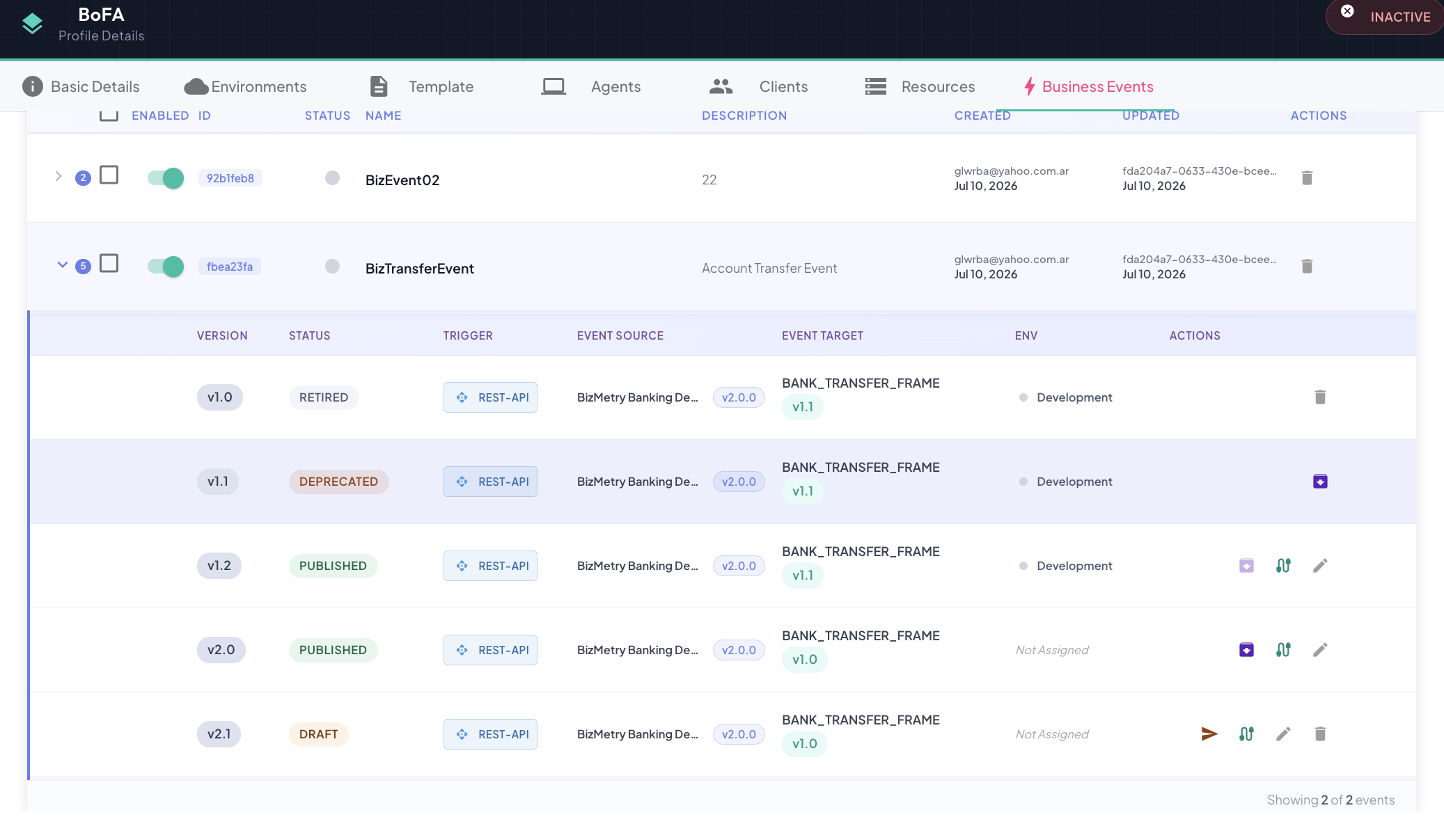
The Business Events tab shows every version of an event in a Version Tree, with:
| Column | Description |
|---|---|
| Version | Version number (e.g., v1.0, v2.0). |
| Status | Current lifecycle state with a color-coded pill. |
| Event Target | The Frame Type + Version this event version targets. |
| Env | The environment(s) this version is currently live for, if any. |
| Actions | Submit, Approve, Reject, Reopen as Draft, Publish, Retire, Reinstate, Delete, or Edit — whichever apply to the version's current state. See Managing Versions for the full state-by-action matrix. |