Recomputing Versions after a Template or API Collection Change
A Business Event version connects two things it doesn't own: the source — the operations of the API Collection it intercepts — and the target — the Frame Type of the Template it populates. Its mappings are only valid as long as both sides stay as they were when the mappings were drawn.
While the Template or the API Collection is still being worked on (not PUBLISHED), it can be edited in place: a component renamed or retyped, a column added, an operation removed, a field added to a response. Instead of leaving the Business Event versions built on it with stale or broken mappings, BizMetry recomputes them automatically, in real time: it reconciles their mappings with the change, and then runs IntelliSense to map what the change left unmapped.
Recompute vs. fork-on-bump
Recompute applies to edits in place of a non-published Template or API Collection. Editing a PUBLISHED Template or API Collection doesn't change it: it creates a new version, and Business Events follow it through fork-on-bump when the new Template version is assigned to an environment.
What Triggers a Recompute
| Change | Business Event versions recomputed |
|---|---|
| Template edited in place — a Frame Type or its components (added, removed, renamed, retyped, constraints changed, Nested Table columns) | Versions whose target is that Template version |
| Referenced ASBO or attribute removed, renamed or retyped in the target Template, including dependencies inside nested BMEL | Versions whose expressions use those resource dependencies, even if their CUSTOM target component is unchanged |
| API Collection edited in place — its contract changes (operations removed, renamed or moved; fields added, removed or retyped) | Versions that source from one of the changed operations |
| API Collections linked to the Template changed — a collection switched to another version, or unlinked | Versions whose target is that Template version: their REST sources are moved to the newly linked collection version, or dropped with the unlinked collection |
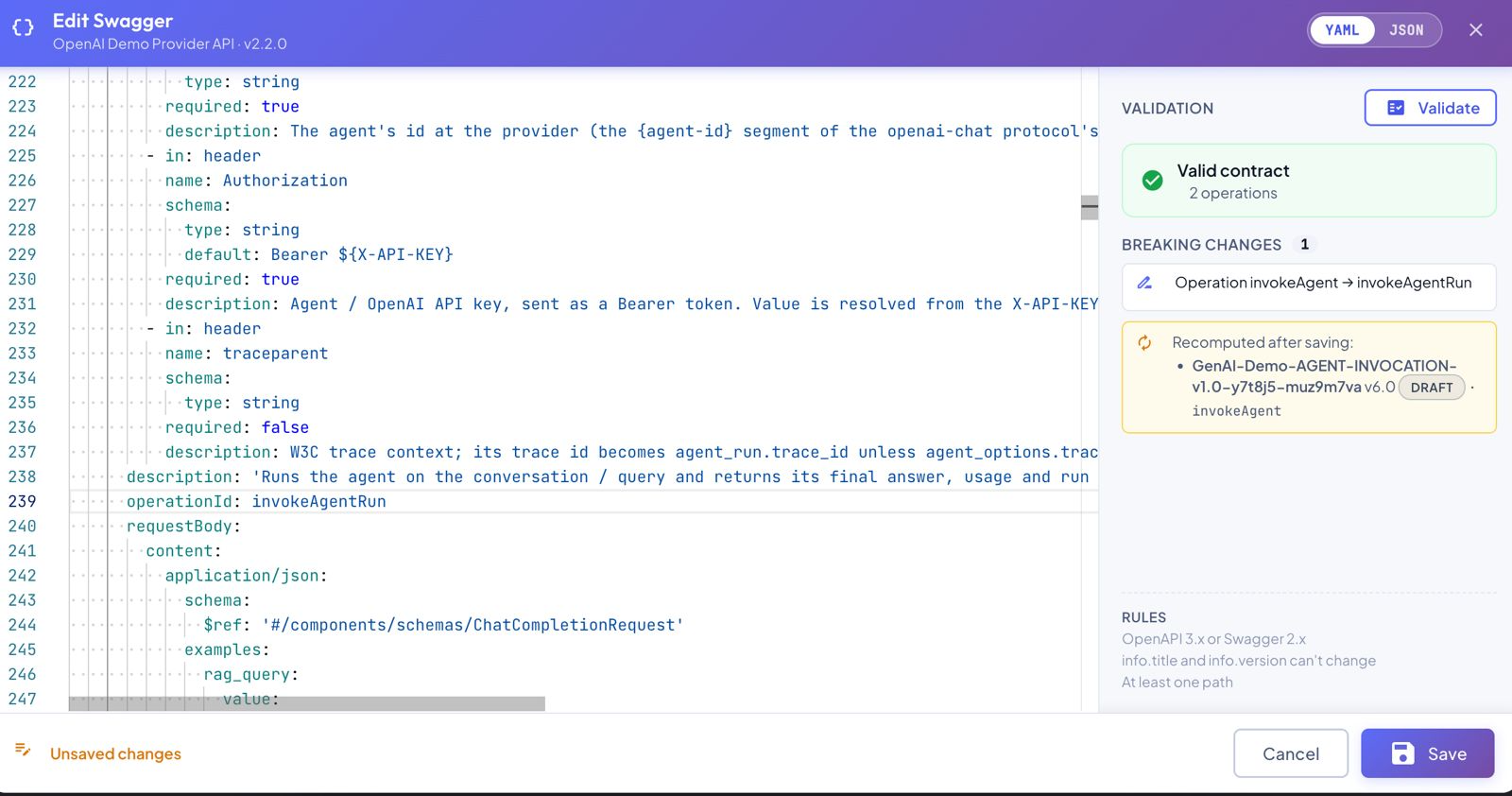
The editors tell you beforehand. In the Template editor's API Collections tab, switching or unlinking a collection shows which Business Events will be recomputed with IntelliSense and go back to DRAFT. When you edit an API Collection's contract, the Swagger editor's Validate panel lists the breaking changes and, under Recomputed after saving, the Business Event versions that use the changed operations (name, version, status and the operations involved):
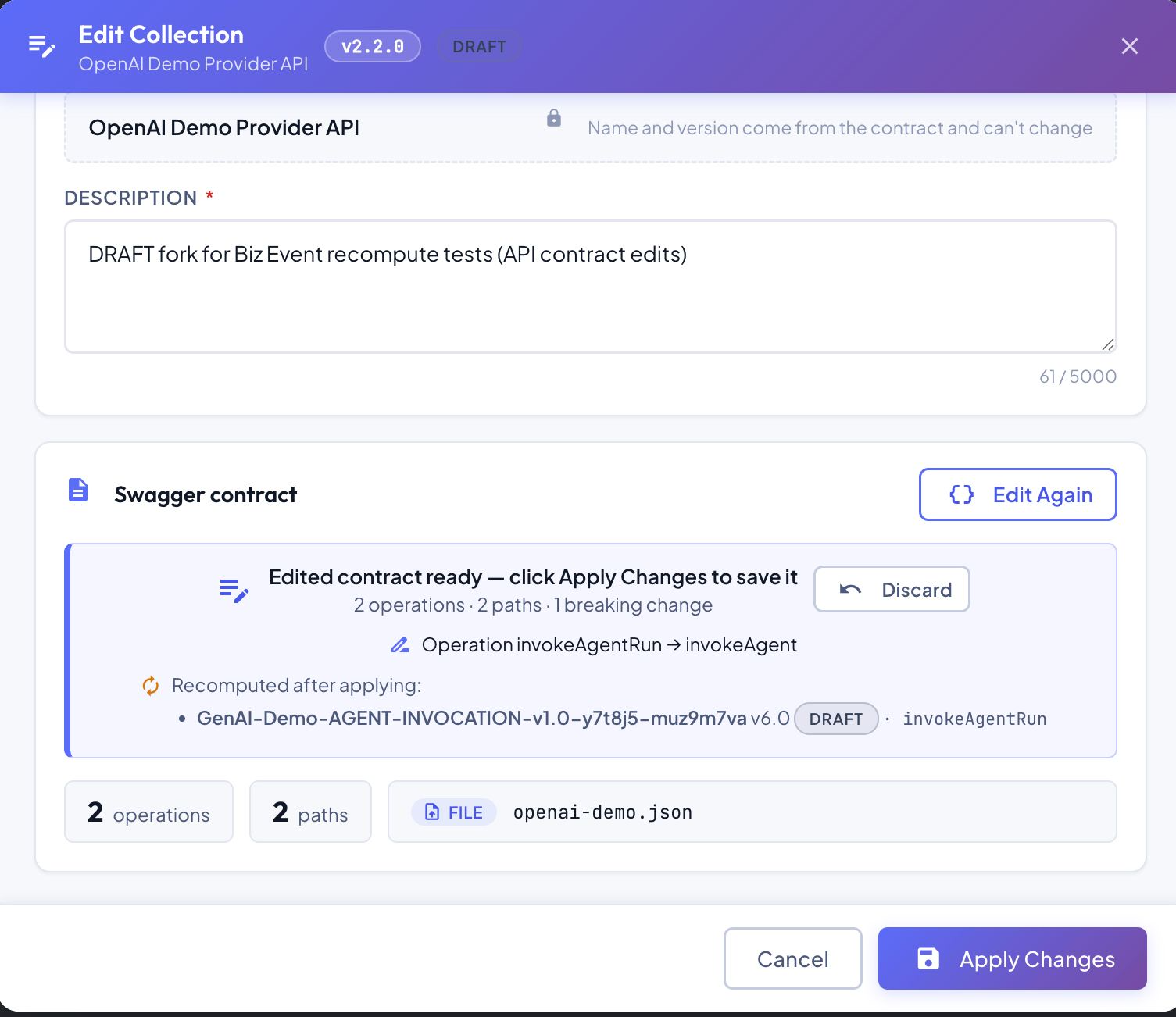
Saving the Swagger doesn't apply it yet: the Edit Collection dialog shows the edited contract with the same summary — Recomputed after applying — and the recompute only starts when you click Apply Changes. Discard drops the edit without touching any Business Event.
Which versions are recomputed
| Version status | Recomputed? |
|---|---|
DRAFT, PENDING_REVIEW, APPROVED, REJECTED | Yes |
PUBLISHED | No — a PUBLISHED version only depends on PUBLISHED Templates and API Collections, which are immutable, so its mappings can't go stale |
DEPRECATED, RETIRED | No |
How the Recompute Works
The recompute runs in the background, right after you save the change: saving the Template or the API Collection never waits for it.
flowchart LR
    A["Template or API Collection
edited in place"] --> B["1 · Deterministic
reconciliation"]
    B -->|nothing left unmapped| D["Recomputed"]
    B -->|targets left unmapped,
or new API fields| C["2 · IntelliSense
remap"]
    C --> D
Step 1 — Deterministic reconciliation
First, each affected version's mappings are reconciled with the exact change set, by fixed rules. This step is immediate.
When the target (Template / Frame Type) changed — only changes to the version's own Frame Type apply:
| Change in the Frame Type | Effect on the mappings |
|---|---|
| Component renamed | The mapping is kept and its target is renamed |
| Component constraints changed | The mapping is kept, flagged for review |
| Component retyped | The mapping is dropped and the component is handed to IntelliSense (step 2) |
| Component added | Reported as unmapped and handed to IntelliSense (step 2) |
| Component removed | The mapping is dropped (there's nothing left to map) |
| Frame Type removed | Every mapping is dropped |
Nested Table columns follow the same rules, column by column: a table keeps its own mapping when only one of its columns changes.
A change only recomputes the versions it actually affects: removing a component that no version had mapped, for instance, leaves every version untouched — no badge, no notification.
When the source (API Collection) changed — only the operations the version sources from apply:
| Change in the API contract | Effect on the sources and mappings |
|---|---|
| Operation renamed | The source and its mappings are rewritten with the new name, and so are the references to the operation inside their BMEL expressions ({operation:Section}) |
| Operation moved (new method or endpoint) | The source follows the operation |
| Operation removed | The source and the mappings reading it are dropped — the summary lists it under Dropped as Source … — operation removed from API collection … — and their targets are handed to IntelliSense over the remaining operations |
| Field removed or retyped | The mappings reading that field (or anything below it) are dropped and handed to IntelliSense |
| Field added | Nothing is rewritten; the new fields are offered to IntelliSense to fill targets that were still unmapped |
ASBO dependencies in BMEL
The documented #{Name} operator identifies resource types and attributes in BMEL. Dependency checks follow their function context, including nested expressions such as:
bmel:get-json-field(bmel:get-resource-by-id(#{Product}, {getOrder:Response Payload}.$.product_id), #{unit_price})
Removing Product or its referenced unit_price invalidates the dependent mapping even when the target frame's computed component did not change. Reconciliation drops the invalid mapping and IntelliSense reviews the remaining sources. If no valid replacement exists, that component stays unmapped for manual review. These checks also apply when editing a Biz Event and forking a Published version; the original Published version remains unchanged.
Step 2 — IntelliSense remap
If step 1 left targets unmapped, or the API contract added fields, IntelliSense runs over the version's operations and the current Template — the same engine you use from the mapping canvas, including the generation of BMEL expressions. It usually takes around a minute.
- Only unmapped targets are filled: mappings that survived step 1 are never replaced.
- A suggestion is applied automatically when its confidence is 0.55 or higher — the same default as the Biz Event composer. Suggestions below that threshold aren't applied; they're listed for review instead.
- When the trigger is a field added to the API contract, a suggestion is applied only if it actually reads one of the added fields. A component that already has a mapping is never moved to the new field — not even when the field is the one it used to read before an earlier change — and if nothing gets mapped, the recompute stays silent.
- A target IntelliSense can't match stays unmapped, for you to complete manually.
IntelliSense works over every operation the version sources from, not only the one that changed — so a dropped mapping can come back from another operation or API Collection that carries an equivalent field. It also writes the BMEL the new source needs:
- a conversion when the types differ — for example, an integer
$.seedmapped to a component retyped to String becomesbmel:to-string({invokeAgent:Request Payload}.$.seed); - an aggregation when the source operation has cardinality MANY — IntelliSense receives each operation's cardinality, so an occurrence array is reduced before reaching a single-value component, for example
bmel:first({createChatCompletion:Request Payload[]}.$.reasoning_effort).
Status after the recompute
| What the recompute did | Version status |
|---|---|
| Dropped mappings or sources, or IntelliSense remapped something | PENDING_REVIEW, APPROVED and REJECTED go back to DRAFT, to be reviewed again |
| Moved the version's REST sources to another collection version, or dropped an unlinked collection | Always back to DRAFT |
| Only renamed targets or flagged constraint changes for review | Status unchanged |
Following the Recompute in Real Time
The Business Events tab shows the recompute as it happens, in the Status column of each affected version. The list refreshes on its own — every 4 seconds while IntelliSense is at work on a listed version — so you don't need to reload the page.
IntelliSense… — the version is being updated
While IntelliSense is mapping what the change left unmapped, the version shows an IntelliSense… badge under its status. Hovering it shows when it started; the mappings appear when it finishes, usually within a minute.

When the reconciliation already had something to report, the Recomputed badge appears next to it right away, and is completed with IntelliSense's result when it finishes.
Editing is on hold while IntelliSense works
While the badge is shown, the version's mappings are about to change, so it can't be opened for editing: an editor would show — and could save over — a stale state. A message tells you it can be edited when IntelliSense finishes. If the version was already open in an editor, the editor shows that IntelliSense is at work and reloads the mappings in place when it finishes; if you have unsaved edits, it offers to reload instead of discarding them.
Recomputed — what changed and why
When the recompute is final, the version shows a Recomputed badge. Hover it to see the summary: first the reason — the change behind the recompute — and then one section for each kind of effect it had.
| Summary section | Meaning |
|---|---|
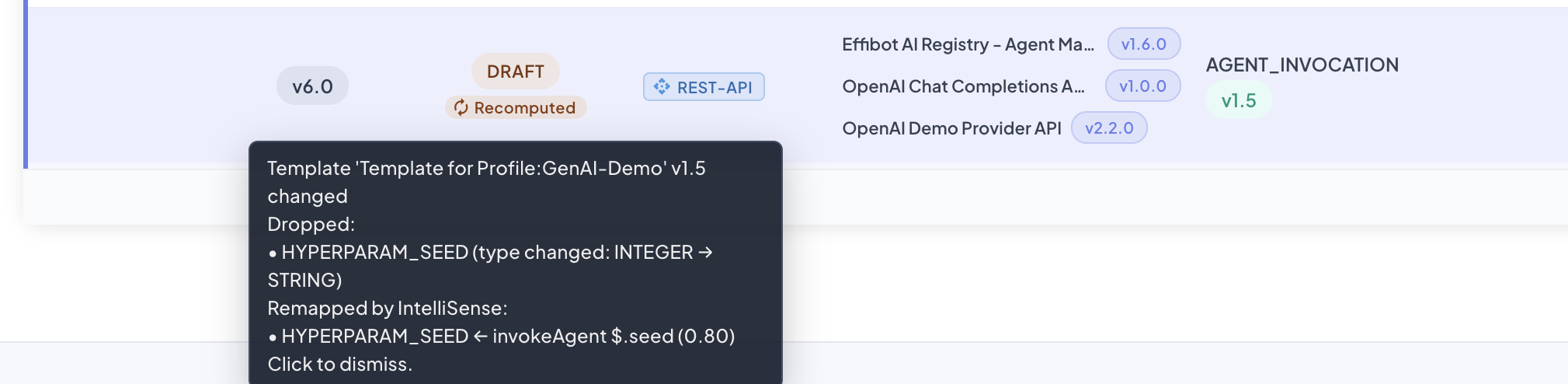
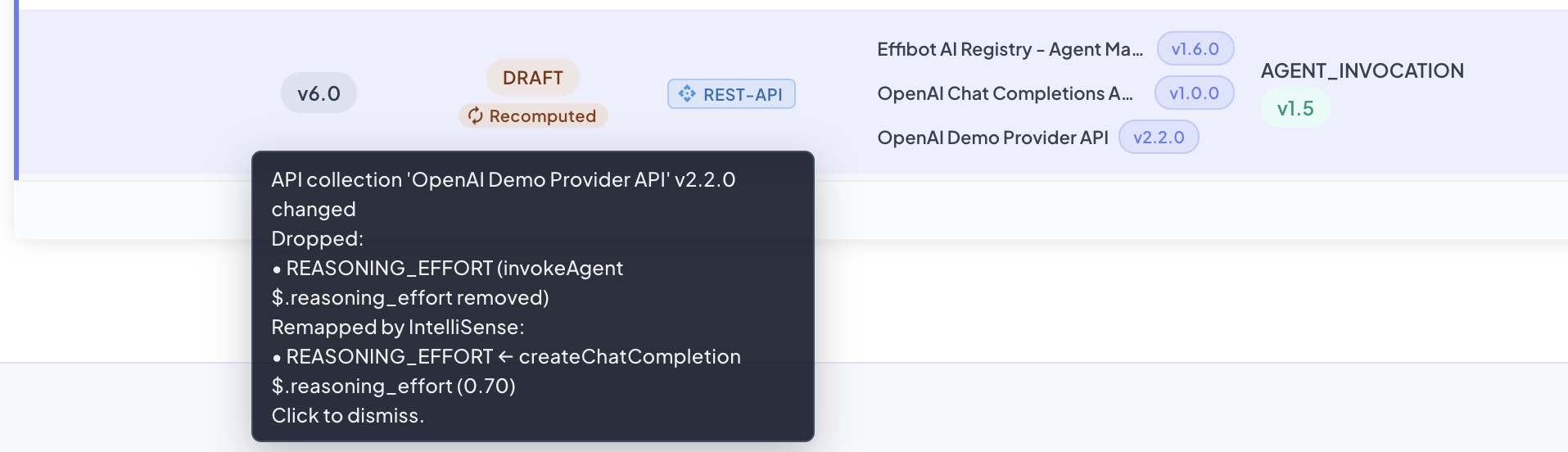
| Reason | The change behind the recompute — for example, Template 'Template for Profile:GenAI-Demo' v1.5 changed or API collection 'OpenAI Demo Provider API' v2.2.0 changed |
| Dropped | Mappings removed because their target or source no longer exists or changed type — including sources whose operation was removed from the API Collection |
| Remapped by IntelliSense | Targets IntelliSense mapped, with the source field and the confidence |
| Updated | Mappings or sources rewritten in place (renamed components, renamed or moved operations) |
| Review | Mappings kept but worth checking (changed constraints), and IntelliSense suggestions below the confidence threshold, which weren't applied |
| New unmapped | Targets still left without a mapping |
| Status reverted | The status the version came from when it went back to DRAFT |
The badge turns to a warning color when the recompute dropped mappings or sources. Click it to acknowledge the recompute and dismiss it — the mappings and the status aren't affected.
The examples below show each section as it appears on a real version.
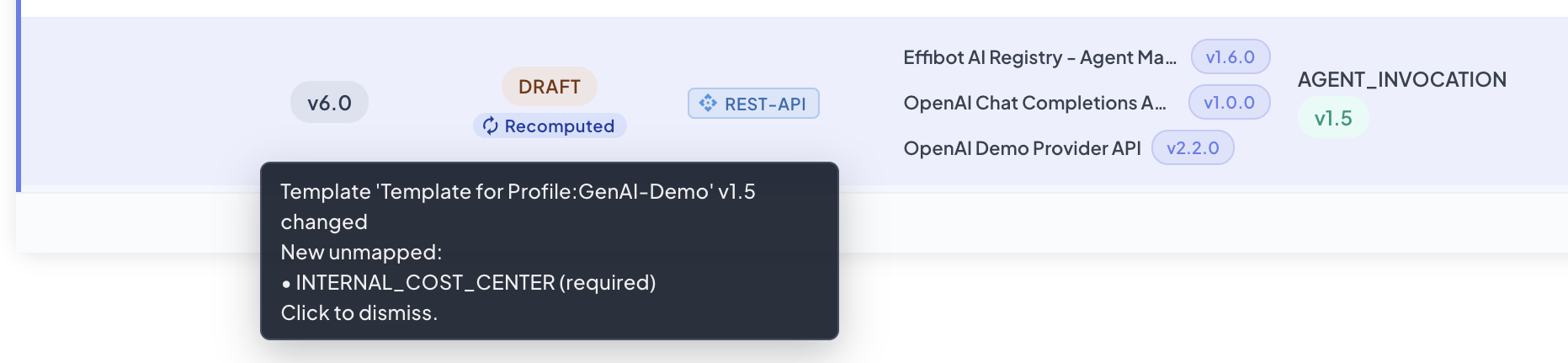
New unmapped — a required component, INTERNAL_COST_CENTER, was added to the Frame Type, and IntelliSense found no field carrying it in the version's operations. The version keeps its status: a new component alone doesn't need rework.
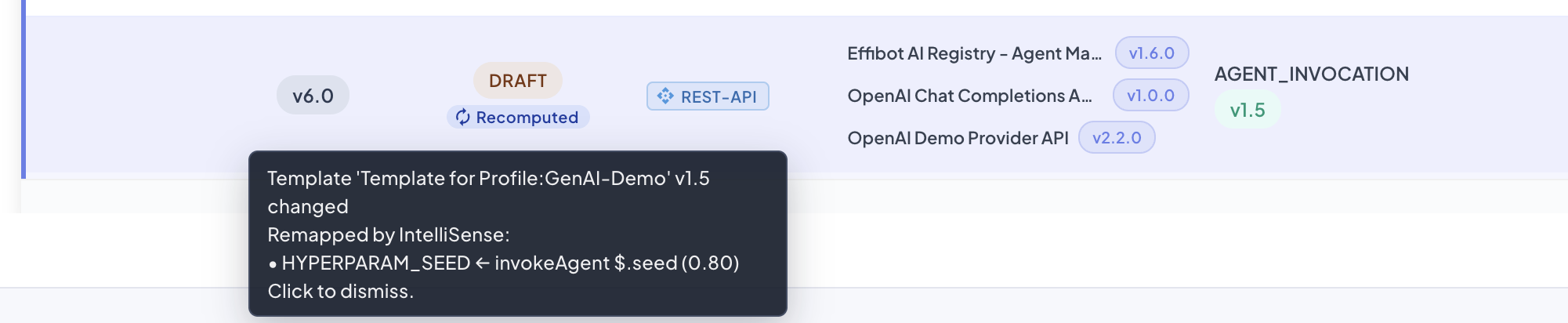
Remapped by IntelliSense — the added component HYPERPARAM_SEED matched the $.seed field of invokeAgent, with a confidence of 0.80, so IntelliSense mapped it and it no longer appears as unmapped.
Remapped by IntelliSense (NESTED_TABLE column) — an OBJECT FIELD REF column, model_supports_vision (aimodel → supports_vision), was added to the LLM_TURN_SUMMARY table. IntelliSense mapped it, row by row, from the field carrying the model's ID — $.model of each createChatCompletion call — with a confidence of 0.80. Columns are listed as TABLE.column.

Updated (Template) — a mapped component was renamed; the mapping follows it under its new name.
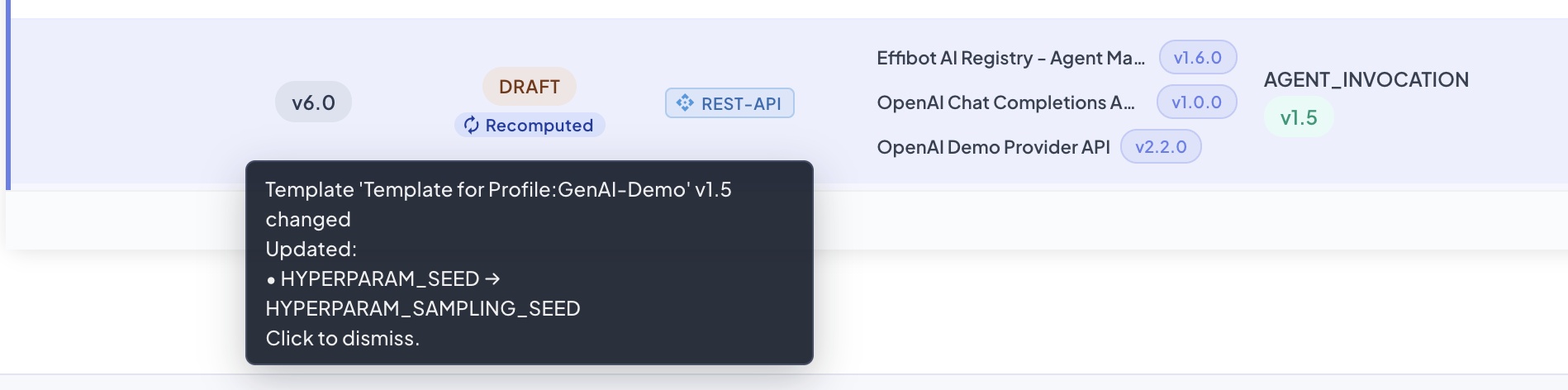
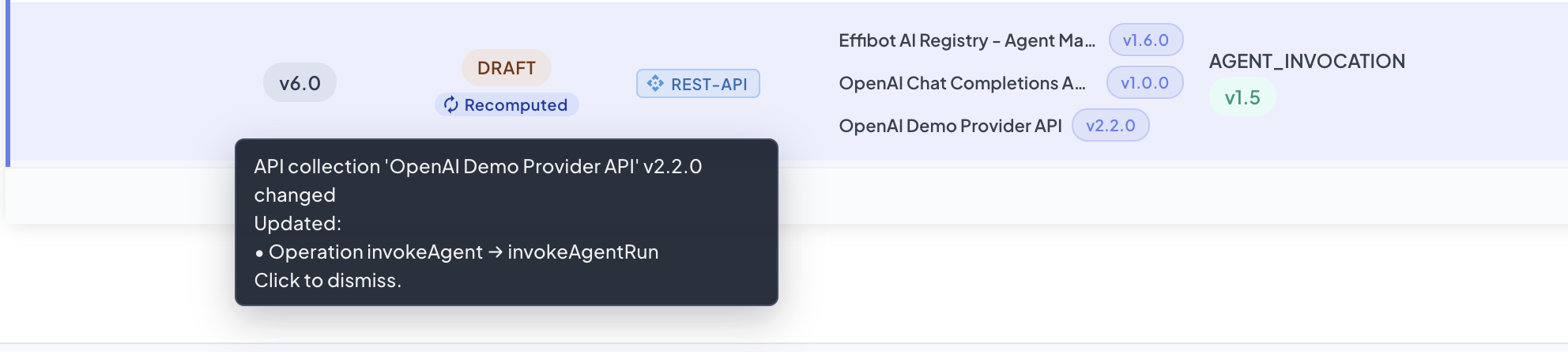
Updated (API Collection) — an operation the version sources from was renamed in the contract; the source, the mappings and their BMEL references follow it.
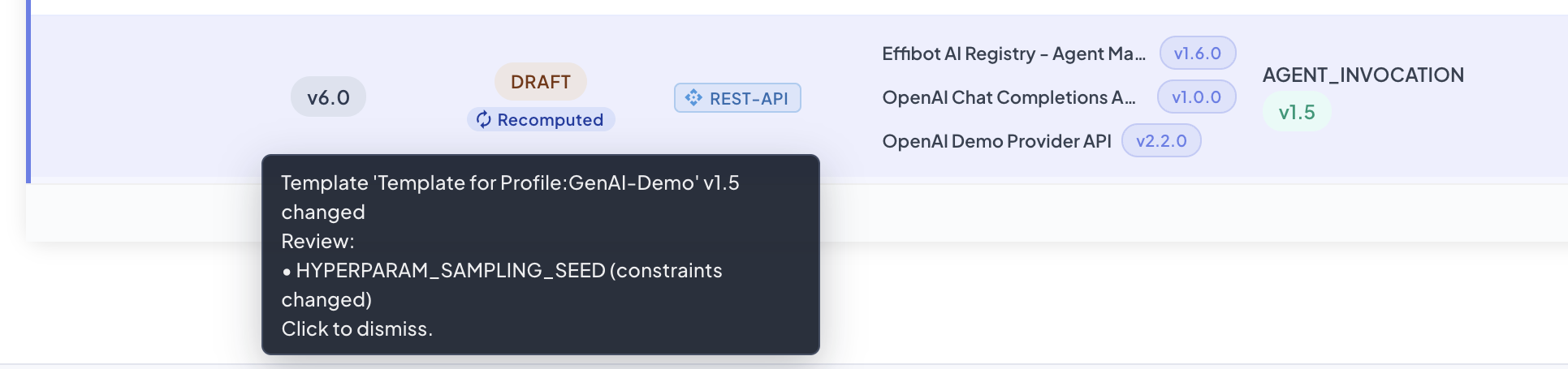
Review — the bounds of a mapped Integer component changed; the mapping is kept, flagged so you can check the values it captures still fit.
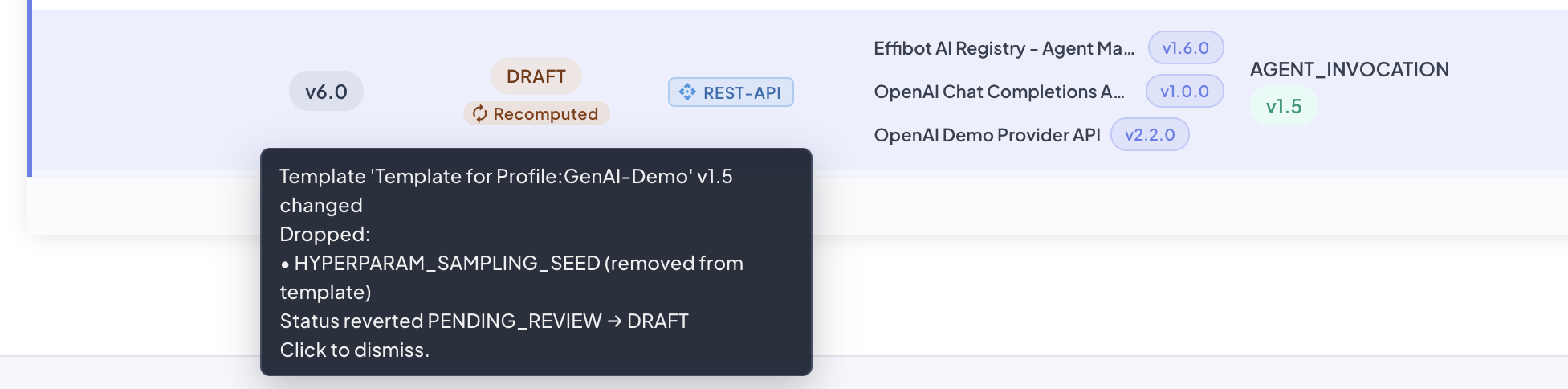
Dropped + Status reverted — a mapped component was removed from the Template while the version was PENDING_REVIEW; the mapping is dropped and the version goes back to DRAFT. The badge shows the warning color.
Dropped + Remapped (type changed) — a mapped component was retyped from Integer to String; the old mapping no longer fits and is dropped, and IntelliSense maps the component again, converting the value (bmel:to-string(…)).
Dropped + Remapped (API field removed) — the reasoning_effort field was removed from the request of invokeAgent; IntelliSense found the same field in another operation of the version, createChatCompletion, from a different API Collection.
Every recomputed version also produces a notification with the same summary, sent once the recompute is final.
Reviewing a Recomputed Version
A recomputed version is a regular DRAFT (or keeps its status, if nothing needed rework). Before publishing it:
- Read the Recomputed summary to see what changed.
- Open the mappings (Edit Mappings) and check the targets Remapped by IntelliSense, and their BMEL expressions.
- Map what's listed as New unmapped, and decide on the suggestions listed for Review.
- Submit it for review and publish it through the normal lifecycle.