Lifecycle & States
Every Business Event Version in BizMetry goes through a defined lifecycle. Understanding these states — and the versioning/reinstatement/deletion rules around them — is essential for managing which events are actively capturing telemetry, which are pending review, and which have been superseded or retired.
State Diagram
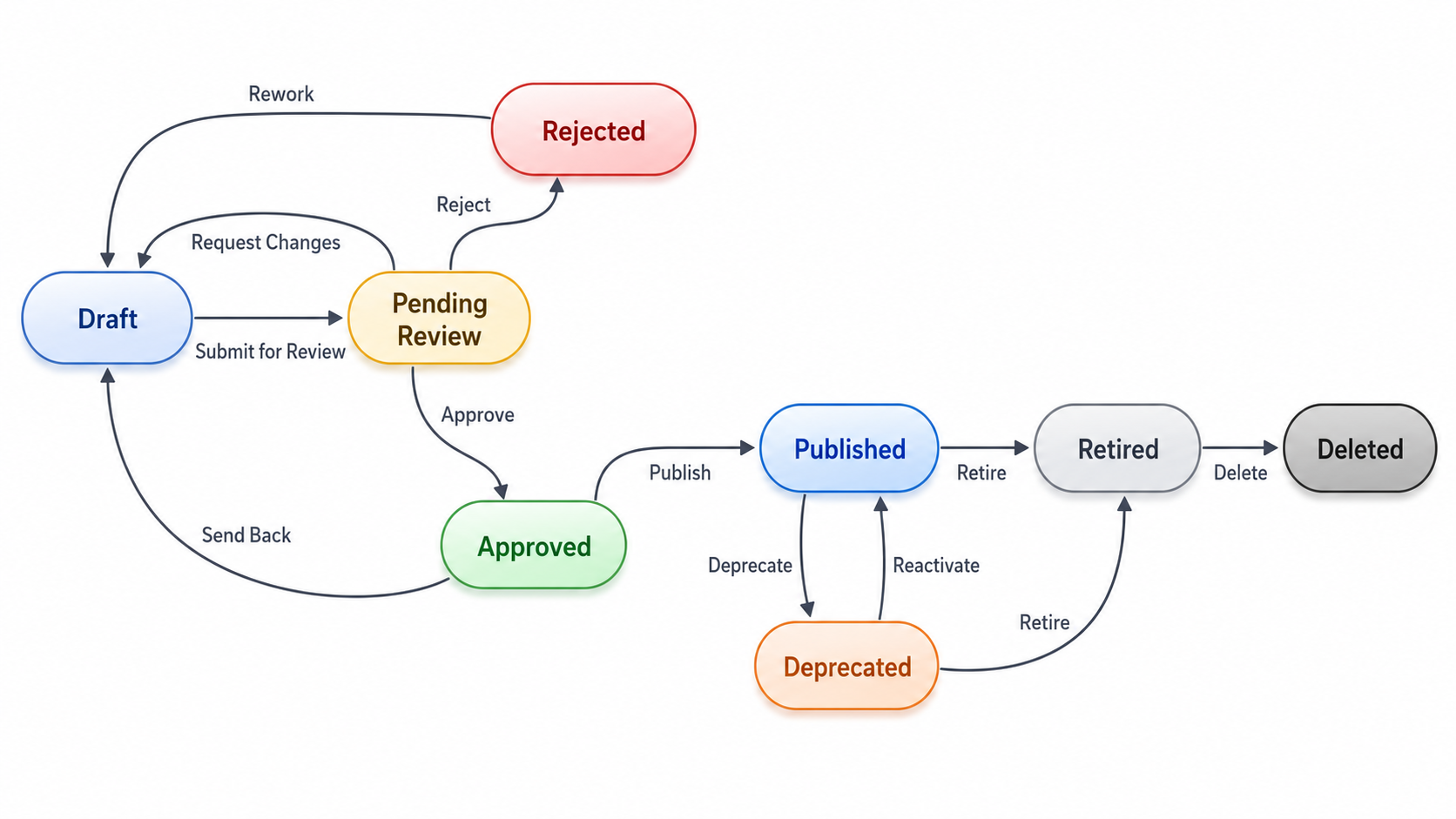
States Reference
DRAFT
A version is in DRAFT when it has been created, forked, or reopened, but not yet published.
| Property | Value |
|---|---|
| Captures telemetry | Yes — to the staging area only, with no impact on live metrics (see Where Captured Metrics Go) |
| Editable | Yes — all fields including mappings |
| Deletable | Yes |
| Agent receives it | Yes — for environments assigned its template version |
A DRAFT version is where you define or refine the event configuration — selecting operations, adjusting field mappings, editing BMEL expressions. Traffic it captures goes to the staging area, so you can test the configuration against real traffic before publishing it.
One DRAFT at a time
Each Business Event can only have one DRAFT version at a time. Publishing the DRAFT or deleting it frees the slot.
PENDING_REVIEW
A version enters PENDING_REVIEW when a DRAFT is submitted for approval (Submit).
| Property | Value |
|---|---|
| Captures telemetry | Yes — to the staging area only |
| Editable | No |
| Deletable | Yes |
| Agent receives it | Yes — for environments assigned its template version |
From here a reviewer either Approves it (→ APPROVED) or Rejects it (→ REJECTED).
APPROVED
A version is APPROVED once a reviewer has signed off on a PENDING_REVIEW version.
| Property | Value |
|---|---|
| Captures telemetry | Yes — to the staging area only |
| Editable | No |
| Deletable | Yes |
| Agent receives it | Yes — for environments assigned its template version |
An APPROVED version can then be Published, as long as its target template version is Published. Until it is, the Publish action stays disabled and its tooltip names the template version that's blocking it. See Biz Event Lifecycle Management.
REJECTED
A version is REJECTED when a reviewer declines a PENDING_REVIEW version.
| Property | Value |
|---|---|
| Captures telemetry | Yes — to the staging area only |
| Editable | No |
| Deletable | Yes |
| Agent receives it | Yes — for environments assigned its template version |
A REJECTED version can be sent back to DRAFT (Reopen as Draft) for another round of edits and re-submission.
PUBLISHED
A version is PUBLISHED when it has been explicitly activated and is ready for telemetry capture by agents. Only a version whose target template version is Published can reach this state.
| Property | Value |
|---|---|
| Captures telemetry | Yes — to the live accounts, updating metrics and KPIs in real time |
| Editable | No — editing forks a new version instead (see Versioning below) |
| Deletable | No — must be DEPRECATED or RETIRED first |
| Agent receives it | Yes |
A PUBLISHED version can coexist with a DRAFT (its child). This allows you to refine the next version without interrupting ongoing telemetry capture from the current one.
Multiple PUBLISHED versions
A Business Event can have multiple PUBLISHED versions simultaneously — one per target Frame Type + Version it points to. This is intentional: different environments (DEV, STG, PROD, etc.) can have the Template assigned at different versions, so each environment's active Template version needs its own PUBLISHED Business Event version to capture telemetry correctly. Publishing a new version only deprecates another PUBLISHED version if it targets that same Frame Type + Version (see Auto-deprecation on publish below).
DEPRECATED
A version is automatically DEPRECATED in either of two situations:
- Its target Frame Type + Version is superseded by a Template bump, and at least one environment has migrated to the new Template version.
- Another version of the same Business Event is published targeting the same Frame Type + Version (see Auto-deprecation on publish).
| Property | Value |
|---|---|
| Captures telemetry | Yes — for environments still on the old template version |
| Editable | No |
| Deletable | No — must be RETIRED first |
| Agent receives it | Yes — for its environment scope |
Deprecation is always automatic — there's no manual "deprecate" action. When a PUBLISHED version is deprecated due to a Template bump, BizMetry simultaneously forks a new DRAFT version pointing to the new template instance, so you can update mappings to match the new template structure.
Deprecation guard
A PUBLISHED version is not deprecated by a Template bump if all environments still reference its template instance. That path only fires when the environment scope of the old version is fully superseded.
A DEPRECATED version can be reinstated to PUBLISHED — see Reinstating a version below.
RETIRED
A version is RETIRED when it has been manually decommissioned and should no longer capture telemetry under any circumstance.
| Property | Value |
|---|---|
| Captures telemetry | No |
| Editable | No |
| Deletable | Yes |
| Agent receives it | No |
Retirement is irreversible. Once RETIRED, a version cannot be re-activated — its only remaining action is Delete.
Retiring a live version
Retiring a PUBLISHED or DEPRECATED version immediately stops telemetry capture for all environments in that version's scope. Agents will stop collecting and forwarding frames for this event until a new version is published.
Versioning
Every Business Event's first version is always 1.0, created in DRAFT status.
From then on, versions are never edited in place once PUBLISHED — editing a PUBLISHED version instead forks a new version (in DRAFT), leaving the original PUBLISHED version untouched and still capturing telemetry. BizMetry calculates the new version number automatically, based on the scope of the change:
Major bump (+1.0)
Triggered only when the edit re-points the version at a different Template Version (i.e. the Version half of the target Frame Type + Version pair changes — see Step 2), regardless of whether the Frame Type also changes. This is treated as a breaking change.
Minor bump
Any other edit produces a minor (decimal) bump instead. The size of the bump depends on what changed — steps are not additive: if a single save touches more than one of these dimensions, only the largest step applies once.
| Change | Bump |
|---|---|
| Frame Type changed, Version unchanged | +0.3 |
| Operations added or removed | +0.2 |
| Mapping added/removed, BMEL expression edited, filter/correlation edited | +0.1 (default) |
Collision-safe numbering
The bumped number is always calculated against the highest existing version for that Business Event (major and minor), not just the version being edited — so re-forking never produces a duplicate version number, even after deletions.
Auto-deprecation on publish
When you transition a version to PUBLISHED, BizMetry checks for any other version of the same Business Event that is currently PUBLISHED and targets the same Frame Type + Version. If one is found, it is automatically transitioned to DEPRECATED — guaranteeing at most one PUBLISHED version per target Frame Type + Version.
Confirmed: scoping by Frame Type + Version is intentional
Multiple environments can have the same Profile's Template assigned at different versions (e.g. DEV on Template v1.1, PROD still on v1.0). Each of those needs its own PUBLISHED Business Event version targeting the matching Frame Type + Version so telemetry capture works correctly per environment. Scoping auto-deprecation to the same Frame Type + Version — rather than deprecating every other PUBLISHED version outright — is what makes that multi-environment coexistence possible.
Reinstating a DEPRECATED version
A DEPRECATED version's summary view shows a Reinstate button only when this state applies. Clicking it transitions the version directly back to PUBLISHED — but only if all these conditions hold:
- The version's current status is
DEPRECATED. - No other version of the same Business Event is currently
PUBLISHEDagainst the same Frame Type + Version this version targets. - Its target template version is still Published (not retired).
If another version is already PUBLISHED for that same Frame Type + Version, reinstating is blocked until that conflicting version is deprecated or retired.
Deletion rules
Whether a version can be deleted depends on its current state:
| State | Deletable? |
|---|---|
DRAFT | Yes, directly |
PENDING_REVIEW | Yes, directly |
APPROVED | Yes, directly |
REJECTED | Yes, directly |
PUBLISHED | No — must be moved to DEPRECATED or RETIRED first |
DEPRECATED | No — must be moved to RETIRED first |
RETIRED | Yes, directly |
So the only path to delete a live version is: PUBLISHED → Retire → RETIRED → Delete (or, if it was already superseded, PUBLISHED → (auto) DEPRECATED → Retire → RETIRED → Delete).
Deleting the last version deletes the Business Event
If the version you delete is the only version the Business Event has, the entire Business Event is deleted along with it — there's no header left with zero versions.
Version Actions by State
| State | Submit | Approve | Reject | Reopen as Draft | Publish | Retire | Reinstate | Delete |
|---|---|---|---|---|---|---|---|---|
DRAFT | ||||||||
PENDING_REVIEW | ||||||||
APPROVED | ||||||||
REJECTED | ||||||||
PUBLISHED | ||||||||
DEPRECATED | ||||||||
RETIRED |
Transition Reference
| From | To | Trigger | Who |
|---|---|---|---|
| (new) | DRAFT | Create wizard or fork | User |
| DRAFT | PENDING_REVIEW | Submit | User |
| DRAFT | (deleted) | Delete action | User |
| PENDING_REVIEW | APPROVED | Approve | User |
| PENDING_REVIEW | REJECTED | Reject | User |
| PENDING_REVIEW | (deleted) | Delete action | User |
| APPROVED | PUBLISHED | Publish (only if the target template version is Published) | User |
| APPROVED | (deleted) | Delete action | User |
| REJECTED | DRAFT | Reopen as Draft | User |
| REJECTED | (deleted) | Delete action | User |
| PUBLISHED | DEPRECATED | Template bump (automatic), or another version published against the same Frame Type + Version (automatic) | System |
| PUBLISHED | RETIRED | Retire action | User |
| DEPRECATED | PUBLISHED | Reinstate (only if no conflicting PUBLISHED version exists) | User |
| DEPRECATED | RETIRED | Retire action | User |
| RETIRED | (deleted) | Delete action | User |