Biz Event Lifecycle Management
A Business Event only feeds live metrics once it's PUBLISHED, and it can only be published on a published template version. This page explains that rule, the steps it implies from an empty profile to live traffic, and what happens to captured metrics before and after publishing.
For the full list of states and transitions, see Lifecycle & States.
Business Events and Template Versions
Every Business Event version targets a template version (and a Frame Type in it), selected in Step 2 of the wizard.
- A Business Event can target a template version in any state before Retired: Draft, Ready for Review, Rejected, Reviewed or Published. You can build and test Business Events while the template is still being designed.
- A Business Event version can move to PUBLISHED only if its template version is Published. While it isn't, the Publish action is disabled and its tooltip names the template version that is blocking it.
Because a template can only be published once all its API Collections are published, a published Business Event always stands on a published template and published API contracts, none of which can change afterwards.
From Setup to Live Traffic
The rules above set a logical order. These are the steps to go from a new profile to an application's traffic being captured and published in BizMetry.
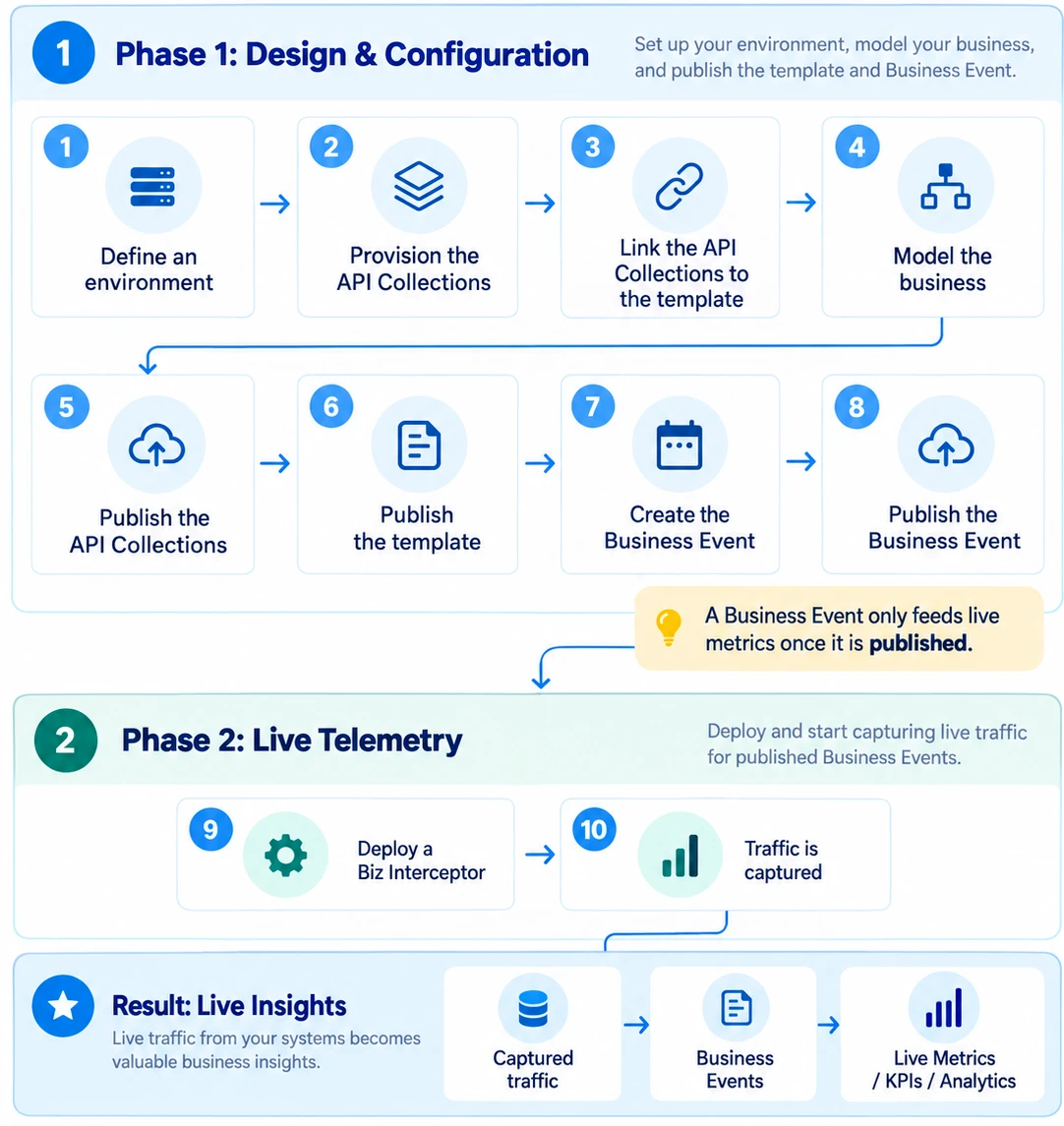
1. Define an environment
Define an environment in the release pipeline of the profile (for example DEV). See Accessing Environments.
2. Provision the API Collections
Register one or more API Collections with the Swagger contracts of the application to monitor. They can be shared by several profiles. See Create from Agent URL or Create from Local File.
3. Link the API Collections to the template
Edit the profile's template and, in the API Collections tab, link the API Collection versions you provisioned.
4. Model the business
Configure the template's client types, resource types, domains and frame types as needed, so the template reflects the business reality you want to monitor.
5. Publish the API Collections
Move each linked API Collection version to PUBLISHED. See Collection Lifecycle.
6. Publish the template
Move the template version to Published. See Version Lifecycle.
7. Create the Business Event
Start the Business Event wizard and select the template version from the previous steps and the target Frame Type. Then:
- Select the API Collection linked to the template from the list.
- Run IntelliSense so BizMetry identifies the API operations that best match the selected Frame Type, and accept its suggestions. See IntelliSense Auto-Mapping.
- Continue through the wizard and configure the mappings between the API and the Frame Type in the Biz Event Composer.
- Make any manual mapping adjustments you need, using BMEL functions where the mapping requires them.
- Save. A new Business Event is created in DRAFT.
8. Publish the Business Event
Move the Business Event version to PUBLISHED through its review flow: Submit, Approve, Publish. See Managing Versions.
9. Deploy a Biz Interceptor
Create a Biz Interceptor linked to the Business Event, download its artifact for the DEV environment, and inject the SDK into the application to monitor in DEV.
10. Traffic is captured
The interceptor starts capturing the application's traffic in DEV. It sends the API metrics in bulk to the environment's Agent, which forwards them to the BizMetry platform for analysis.
Where Captured Metrics Go
Interceptors capture and upload traffic for Business Events whether they're published or not. What changes is where the metrics land:
| Business Event state | Destination | Effect |
|---|---|---|
| Not published (Draft, Pending Review, Approved, Rejected) | A staging area of the platform, where they can be evaluated. | No impact on live metrics or KPIs. |
| PUBLISHED | The live accounts of the platform. | Metrics and KPIs are updated in real time. |
Traffic captured by Live Discovery Mode also goes to the staging area.
Use DRAFT to experiment
The DRAFT state lets you try out a Business Event configuration against real traffic and check the results in staging before making it public. Publish it only when the captured data looks right.