Business Events
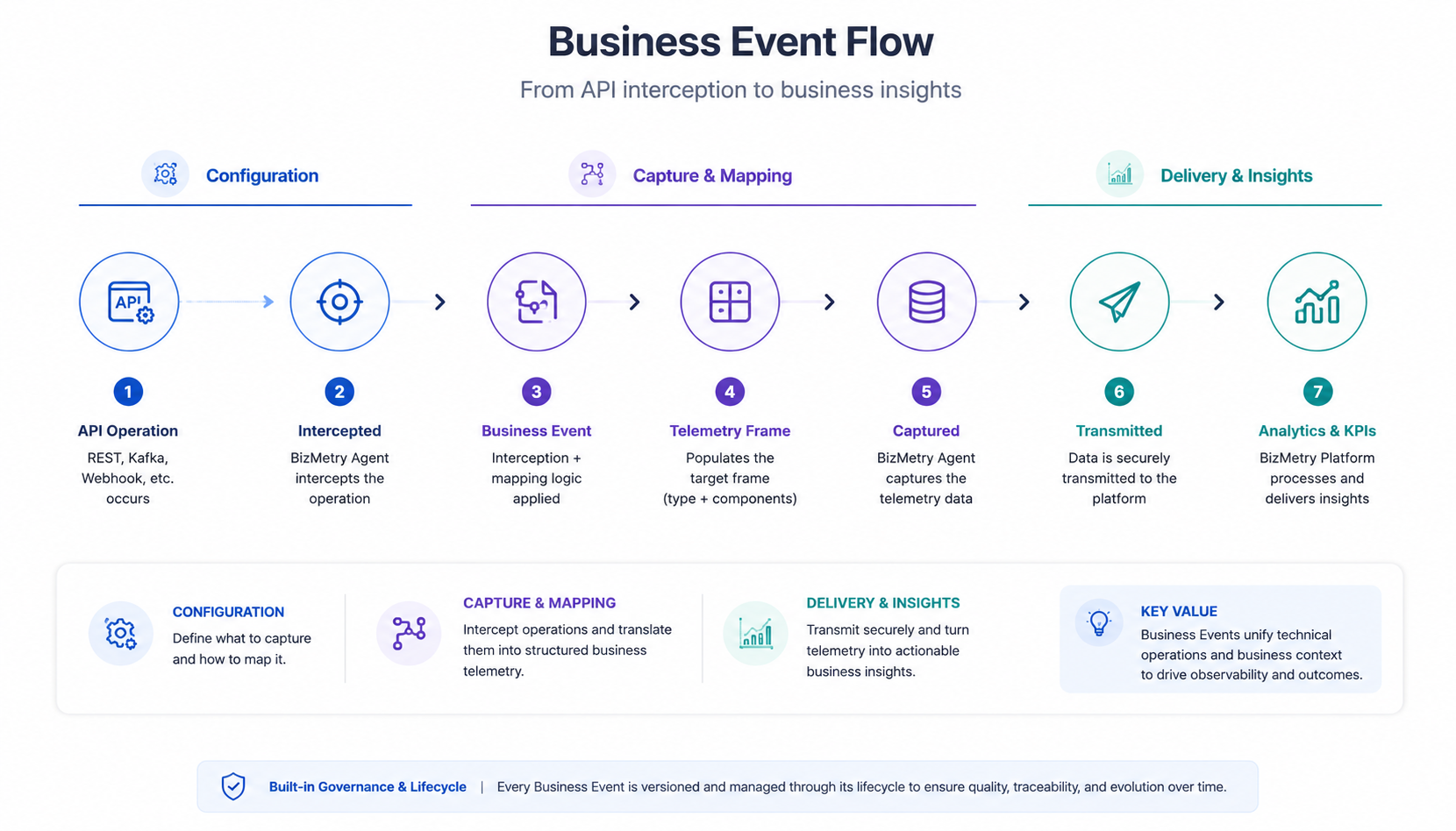
A Business Event is the core abstraction that connects an external API operation to a BizMetry Telemetry Frame — defining when to capture telemetry, where to intercept it, which fields to extract, and how to map them to the Frame components your Template defines.
If the Telemetry Template is the blueprint of what you want to observe, a Business Event is the wiring that makes observation happen at runtime.
Concept Overview
When an external system calls one or more API operations on your platform, BizMetry needs to know:
- Which call to intercept — the API Collection and specific operations, chosen among the API Collections linked to the template version.
- Which frame type to populate — the target Telemetry Frame in the Template.
- Which fields from the request/response payload to extract — and how to map them to frame components.
A Business Event encapsulates all of this configuration in a single, versioned, lifecycle-managed entity.
Business Event Components
Each Business Event is composed of:
| Component | Description |
|---|---|
| Identity | Name, description, and interception mode (INBOUND, OUTBOUND, INBOUND_OUTBOUND). |
| Target Frame | The Frame Type from the Template that this event will populate when fired. |
| Event Source | The transport mechanism — REST API, Kafka Topic, MQTT Queue, or Webhook. |
| Selected Operations | The specific API operations (endpoints + HTTP methods) to intercept. |
| Field Mappings | The mapping between source fields (request/response payload) and target frame components. |
| BMEL Expressions | Optional expressions written in the BizMetry Expression Language for computed or multi-field mappings. |
Lifecycle
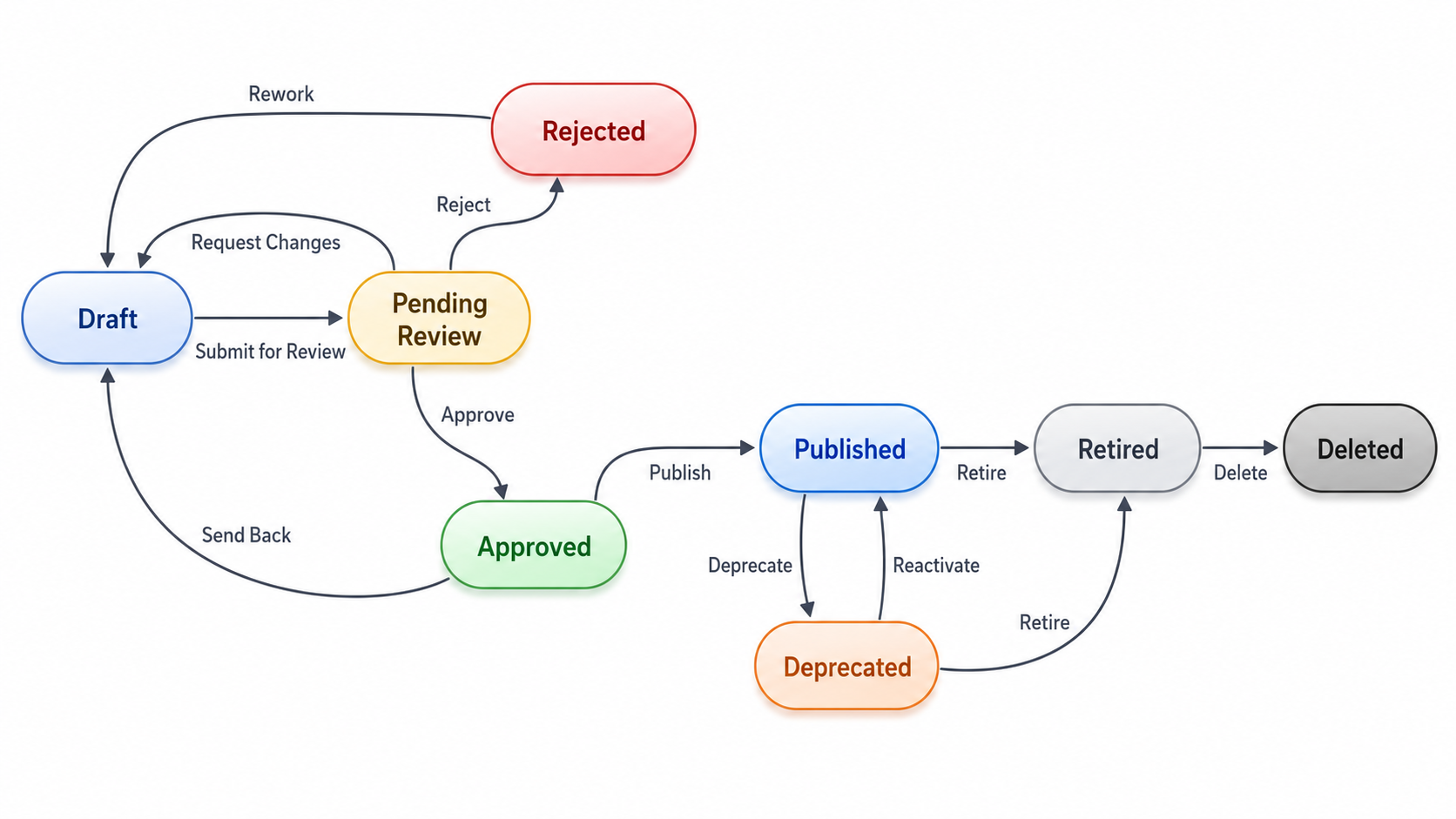
Business Events are versioned entities. Each version goes through a managed lifecycle:
Editability
A Business Event version can be edited in any state except DEPRECATED and RETIRED (i.e. DRAFT, PENDING_REVIEW, APPROVED, REJECTED, and PUBLISHED are all editable). What "editing" does depends on where the version starts:
- From
DRAFT,PENDING_REVIEW,APPROVED, orREJECTED, saving an edit updates that same version in place and moves it back toDRAFT— this restarts the review cycle (Submit→Approve/Reject). - From
PUBLISHED, a version is never modified in place — saving an edit automatically forks a newDRAFTversion instead, leaving the originalPUBLISHEDversion untouched and still capturing telemetry.
| Status | Editable? |
|---|---|
DRAFT | Yes — saves in place |
PENDING_REVIEW | Yes — reverts to DRAFT |
APPROVED | Yes — reverts to DRAFT |
REJECTED | Yes — reverts to DRAFT |
PUBLISHED | Yes — forks a new DRAFT version |
DEPRECATED | No |
RETIRED | No |
DELETED | No (terminal state) |
See Editing a Business Event for the full walkthrough, and Lifecycle & States and Versioning for the underlying rules.
Accessing Business Events
- Open a Profile from the Home Screen.
- From the Profile's tab bar, click on Business Events.
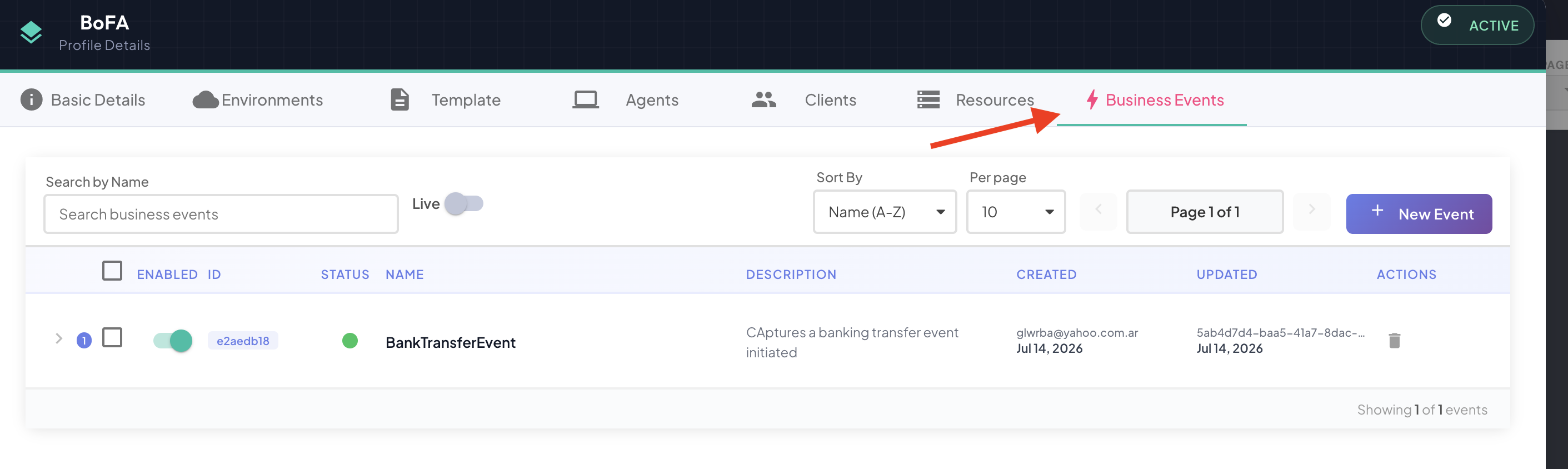
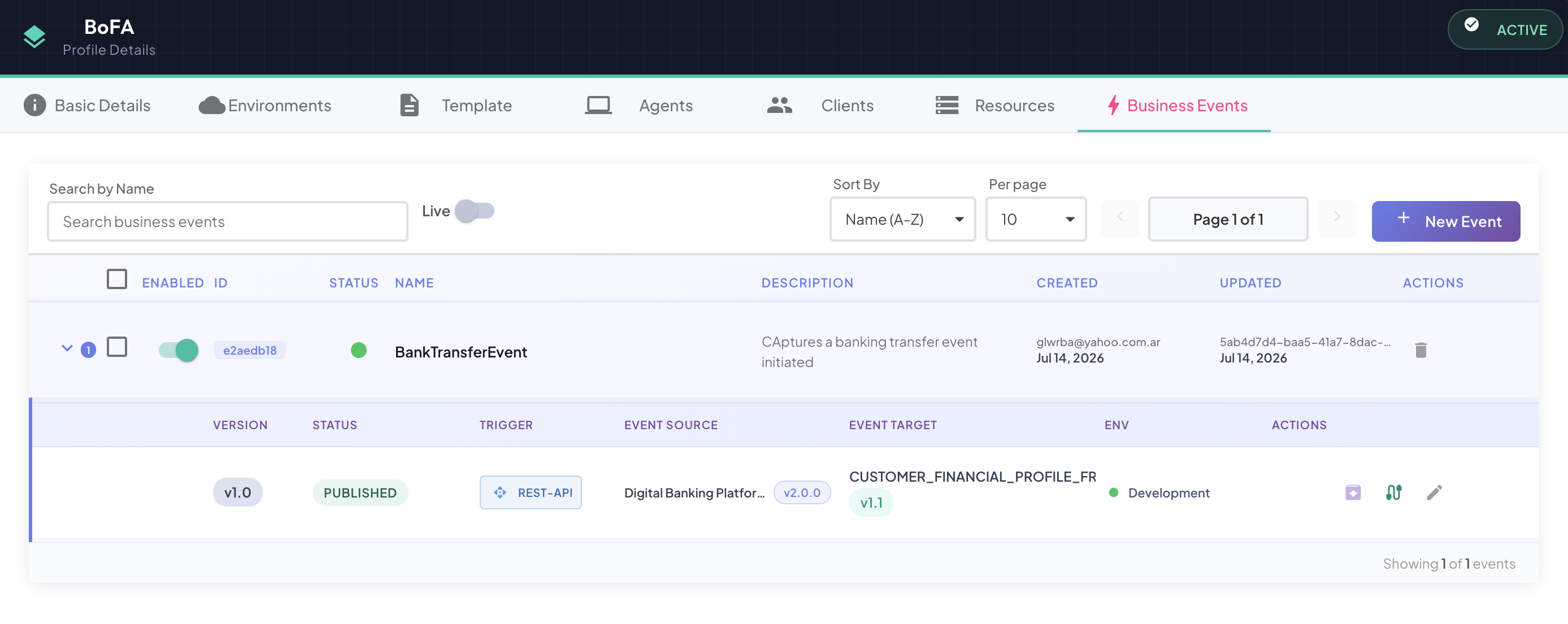
The Business Events tab opens, showing all events and their current versions.
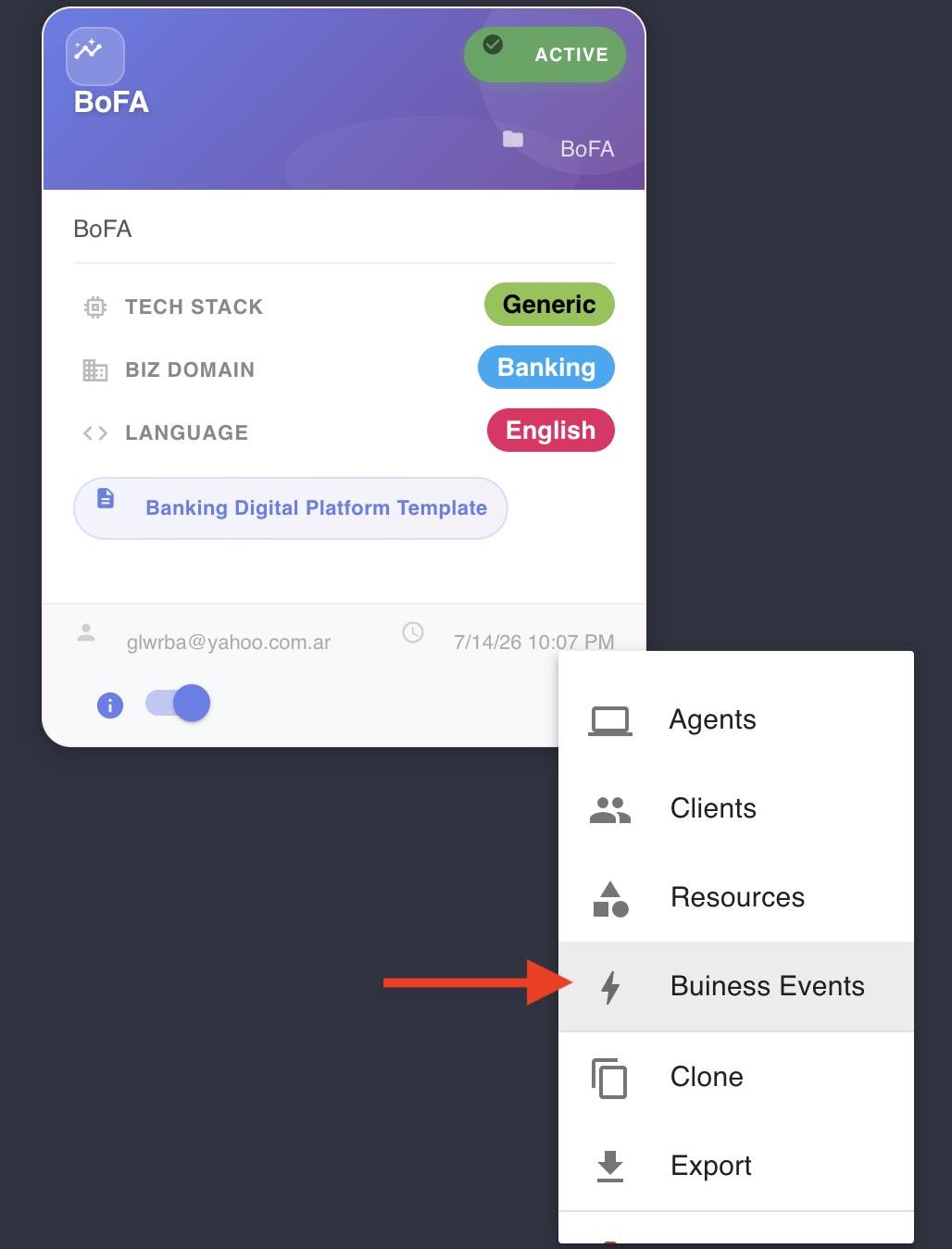
Alternatively, you can access business events for a certain profile by clicking on the secondary menu icon, and from there, selecting the Business Events option as shown below
Business Events Tab Overview
The tab displays a list of all Business Events defined for this Profile:
| Column | Description |
|---|---|
| Event Name | Identifier for this business event. |
| Source | API Collection and transport type. |
| Target Frame | The Frame Type this event maps to. |
| Version | Current active version number. |
| Status | Lifecycle state of the current version: DRAFT, PENDING_REVIEW, APPROVED, REJECTED, PUBLISHED, RETIRED, DELETED. |
| Actions | Create new version, edit, manage lifecycle transitions. |
In This Section
- Lifecycle & States
- Biz Event Lifecycle Management — publishing rules and the steps from setup to live traffic
- Creating a Business Event
- Editing a Business Event
- Cloning a Business Event
- Tracking API Swagger Version Bumps Across Environments
- BMEL Expression Language
- IntelliSense Auto-Mapping
- Versioning & Fork-on-Bump
- Managing Versions