Security Internal Configuration
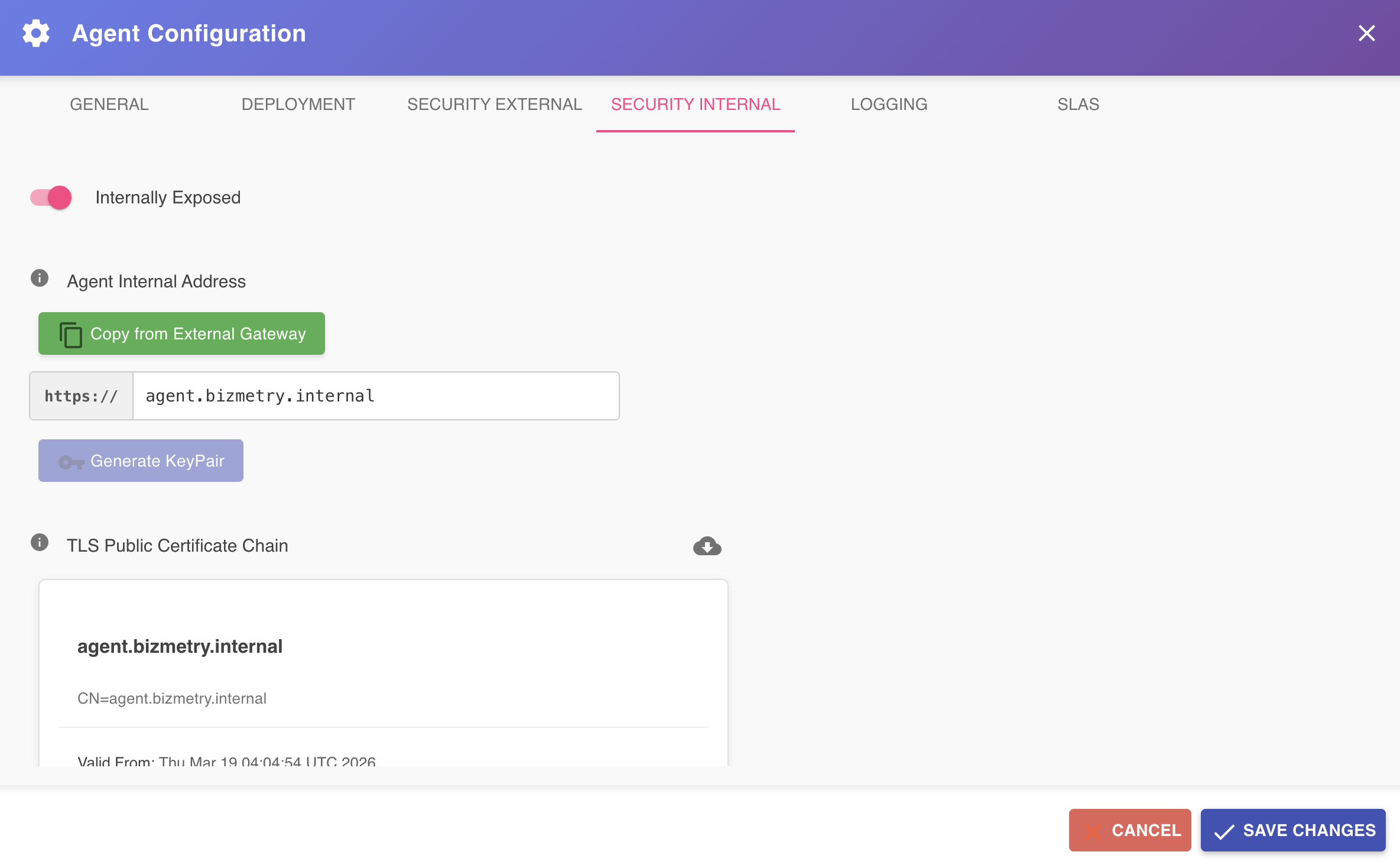
The Security Internal tab allows you to configure the TLS settings associated with the internal load balancer that exposes the agent to the applications and clients running inside your private network. This configuration is used by the agent installer when creating the internal ingress load balancer, and enables encrypted, secure communication between the agent and the individual applications that deliver business metrics to it — whether through the BizMetry Plugin deployed in the API Gateway, or directly via the BizMetry SDK.
To access this tab, open the Agent Configuration dialog and select Security Internal from the tab bar.
Ingress Architecture
The diagram below depicts the internal ingress architecture. The red lines represent the inbound traffic that flows from the BizMetry Plugin — deployed within the API Gateway — and from the BizMetry SDK — embedded in individual business applications — through the ingress load balancer, and into the agent Pod via the internal agent ingress.
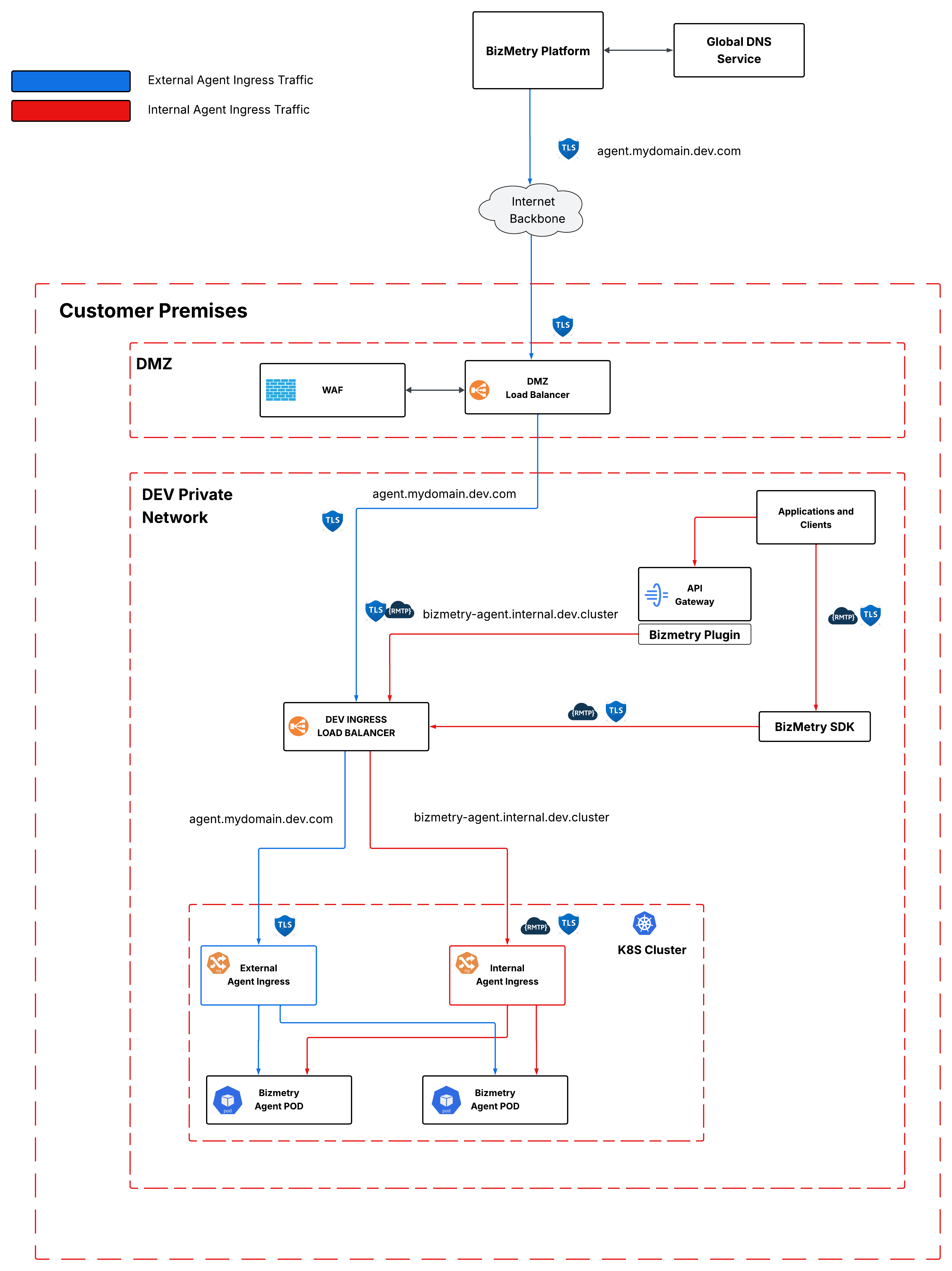
Unlike the external certificate — which protects the communication between the BizMetry platform and the agent — the internal certificate secures the communication between the applications and the agent. It is applied to the internal agent ingress and encrypts all traffic end-to-end, from the instrumented applications all the way down into the agent Pod, ensuring that metric data remains protected within the boundaries of your private network.
Enabling Internal Exposure
When accessing this tab for the first time on a newly configured agent, the Internally Exposed toggle is off by default. While disabled, the agent cannot receive instrumentation data from applications or the BizMetry Plugin, which means no business metrics will be collected.
The first step is to enable this toggle. Once activated, the rest of the configuration form becomes visible.

Business metric collection will not work until this is configured
While the Internally Exposed toggle is off, the agent cannot receive instrumentation data from any application — regardless of whether the BizMetry Plugin or SDK are correctly deployed. Enable this toggle and complete the configuration before deploying the agent.
Agent Deployment Topology
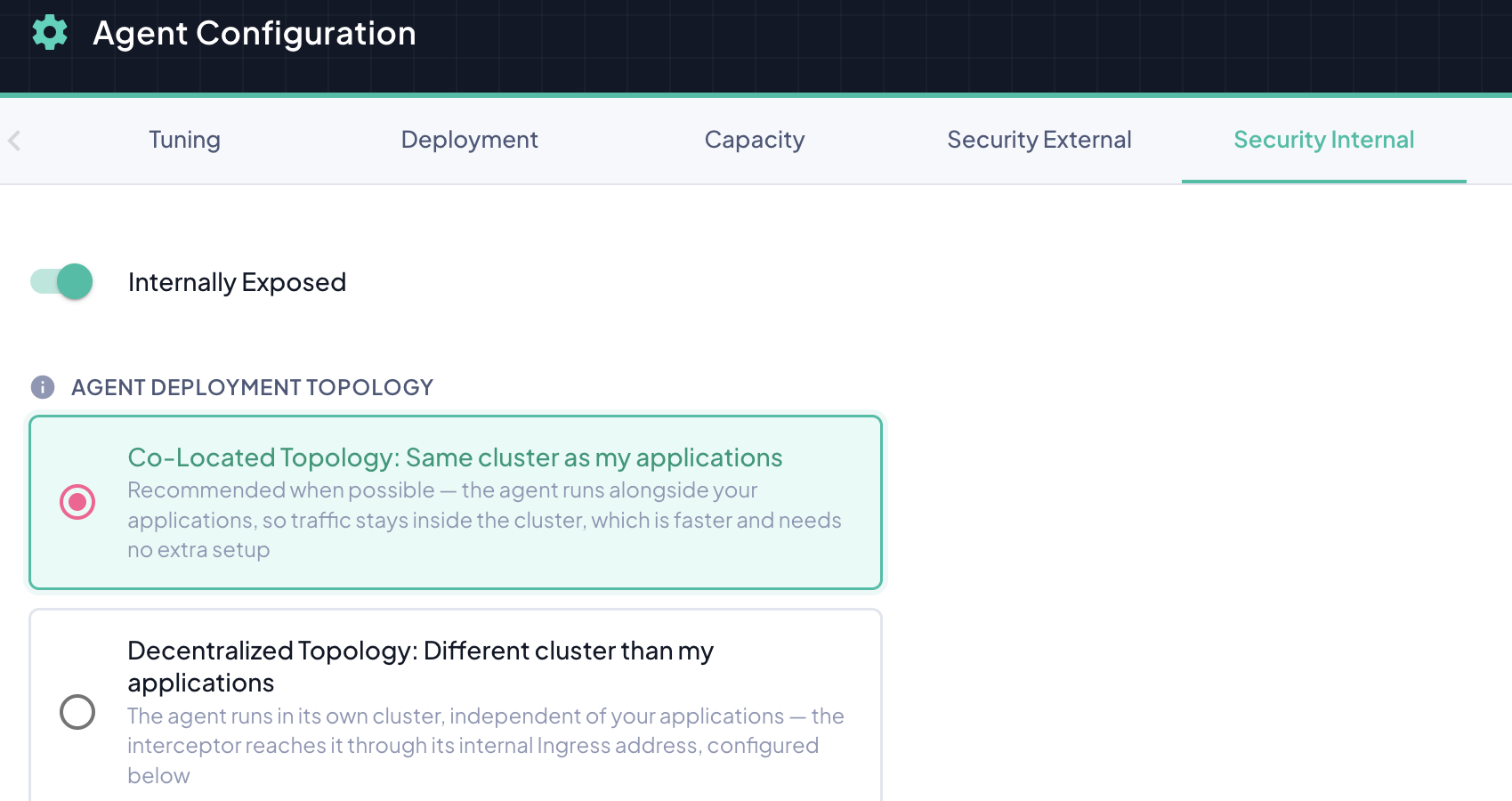
Once Internally Exposed is on, the Agent Deployment Topology choice determines how the interceptor (running inside your business application's cluster) reaches the agent — and how much of the rest of this tab you actually need to fill in.
| Option | Meaning |
|---|---|
| Co-Located Topology: Same cluster as my applications | The agent and the instrumented applications run in the same Kubernetes cluster. The interceptor reaches the agent directly through its internal Kubernetes Service — traffic never leaves the cluster network, and TLS termination isn't needed for this hop since nothing is exposed outside the cluster boundary. |
| Decentralized Topology: Different cluster than my applications | The agent runs in a different cluster than the applications it instruments. The interceptor reaches the agent through the internal Ingress address configured below, over TLS. |
Co-Located Topology is the recommended option whenever it's actually possible for your deployment — it needs no ingress hostname, no DNS entry, and no certificate to manage for this hop, and it's faster since traffic stays inside the cluster network. Selecting it hides the rest of this tab entirely: there is nothing left to configure.
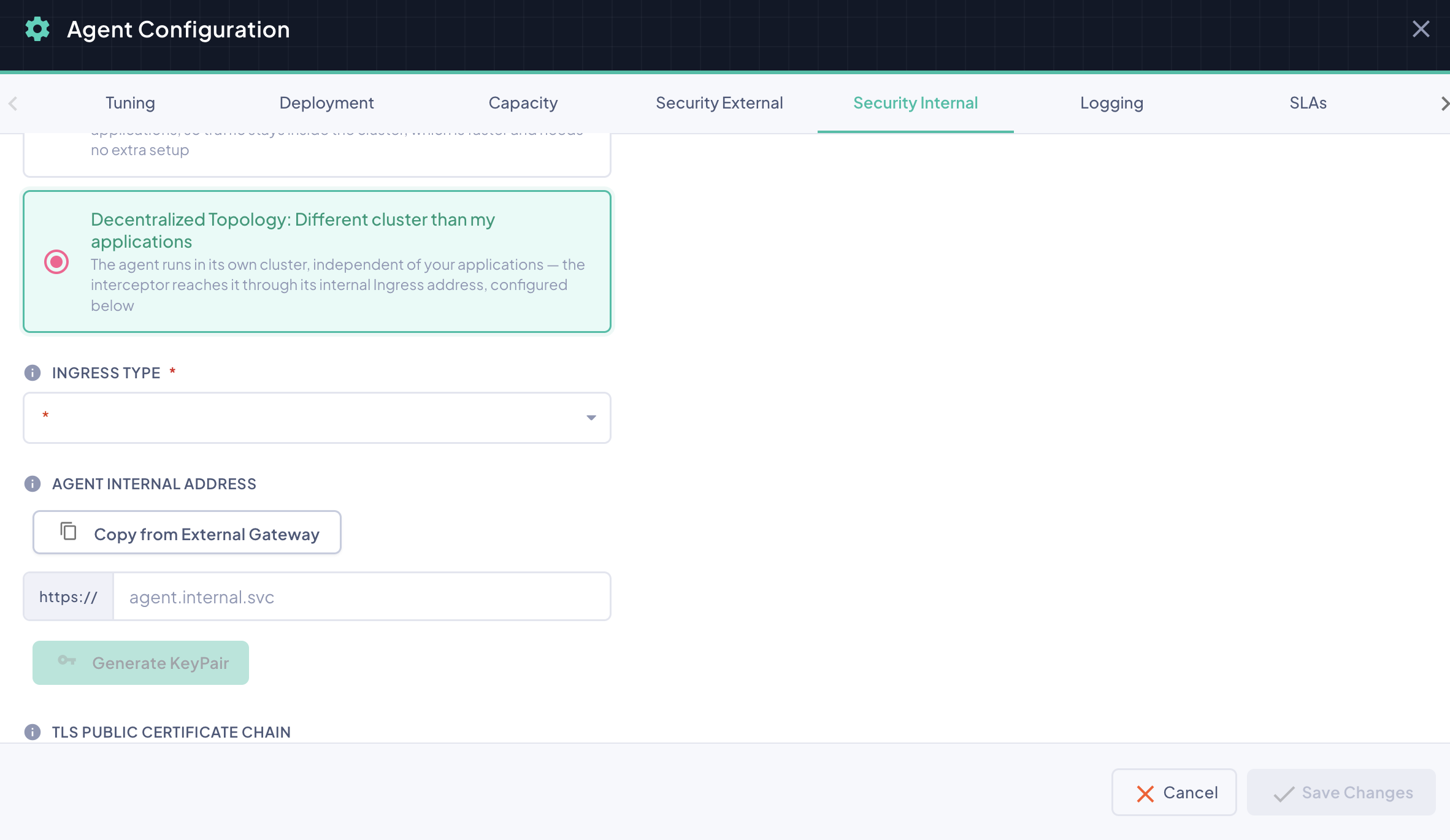
Selecting Decentralized Topology brings back the Ingress Type, Agent Internal Address, key pair, and certificate chain sections below — complete those exactly as described in the rest of this page.
Not sure which one applies?
If the Kubernetes manifest generated for this agent deploys it into the very same cluster/namespace your instrumented applications already run in, choose Co-Located Topology. If the agent is meant to sit in a separate cluster — a common setup when a single BizMetry agent serves applications spread across a different clusters — choose Decentralized Topology instead. See Understanding Agent Deployment Topology for the full trade-offs between the two.
Ingress Type
Only needed for Decentralized Topology
With Co-Located Topology, the interceptor reaches the agent directly inside the cluster, so no ingress controller is involved and this field is not shown. It only applies when the agent runs in a different cluster than your applications.
When the agent runs in its own cluster, applications reach it through an ingress load balancer. The Ingress Type selector tells BizMetry which ingress controller is running in the target cluster, so that the installer can prepare the matching configuration.
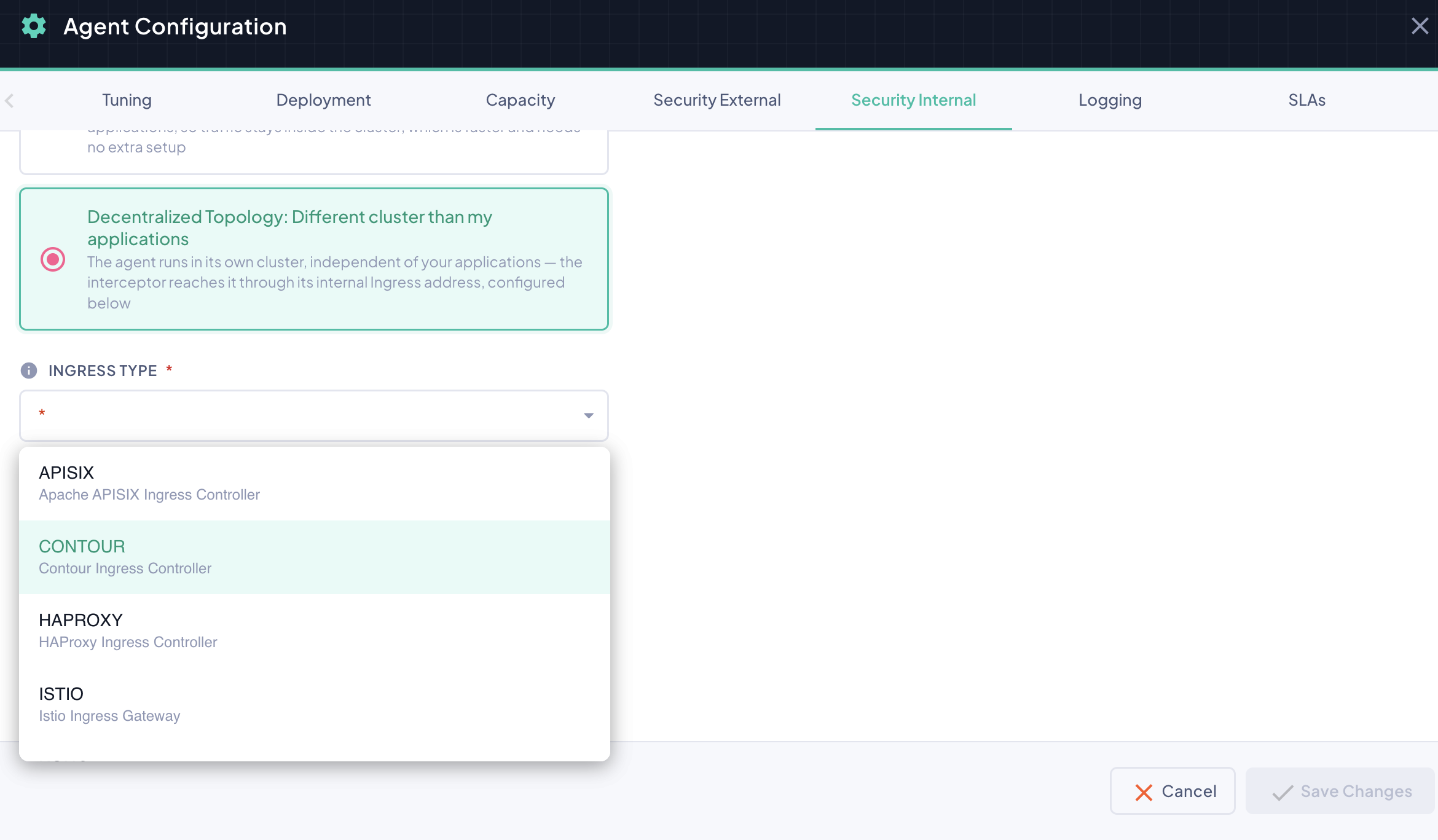
BizMetry supports the following ingress controllers:
| Ingress Type | Description |
|---|---|
| APISIX | Apache APISIX Ingress Controller |
| CONTOUR | Contour Ingress Controller |
| HAPROXY | HAProxy Ingress Controller |
| ISTIO | Istio Ingress Gateway |
| KONG | Kong Ingress Controller |
| NGINX | NGINX Ingress Controller |
| TRAEFIK | Traefik Ingress Controller |
The field is required for a Decentralized agent: Save Changes stays disabled until an ingress type is selected.
Selecting the wrong ingress type will cause the installation to fail
Before choosing a value, verify which ingress controller is installed and active in the target Kubernetes cluster. If the selection does not match the controller actually running there, the installation will not complete.
Choosing it at install time
If the agent is set to provide deployment parameters at install time (see Deployment Configuration), the ingress type is not stored with the agent; the installer asks for it instead.
Agent Internal Gateway Address
Only needed for Decentralized Topology
This section — along with the ingress type, key pair generation, and the certificate chain — only applies when Agent Deployment Topology is set to Decentralized Topology. With Co-Located Topology selected, none of it is shown or required.
The Agent Internal Gateway Address is the private URL through which business applications reach the agent to deliver instrumentation data. It is typically a hostname resolvable via your organization's internal DNS, mapped to the ingress load balancer running inside the Kubernetes cluster.
This URL is strictly internal — it is only accessible from within your private network and is never exposed to the internet by design. BizMetry does not perform DNS validation on this field since the URL cannot be resolved from outside your infrastructure.
If you have already configured an address in the Security External tab, you can populate this field automatically by clicking Copy from External Gateway. This is useful in deployments where both the internal and external gateways share the same hostname.
Ask DevOps for this URL
The internal gateway address must be provisioned and registered in the internal DNS by your DevOps team before you configure this tab. Make sure the URL is active, resolvable from within the private network, and mapped to the correct ingress load balancer before proceeding.
Requirements
The URL provided here must satisfy all of the following conditions:
Internal-only reachability The endpoint must only be addressable from within the private network. It should not be reachable from the internet under any circumstances.
Internal DNS resolution The hostname must be registered in your organization's internal DNS and resolve to the private IP address of the ingress load balancer deployed in the target Kubernetes cluster.
Generating the Key Pair
Unlike the external configuration — where the TLS certificate is provided by an external load balancer already in place — the internal TLS key pair is generated directly by BizMetry. This simplifies the setup considerably, as there is no need to obtain or manage certificates from an external CA for internal traffic.
Once you have entered the internal gateway URL, click the Generate KeyPair button to trigger the key pair generation.
BizMetry will generate a public/private key pair scoped to the hostname you provided. Once generation completes, both the TLS Public Certificate Chain and the TLS Private Key sections are populated automatically.
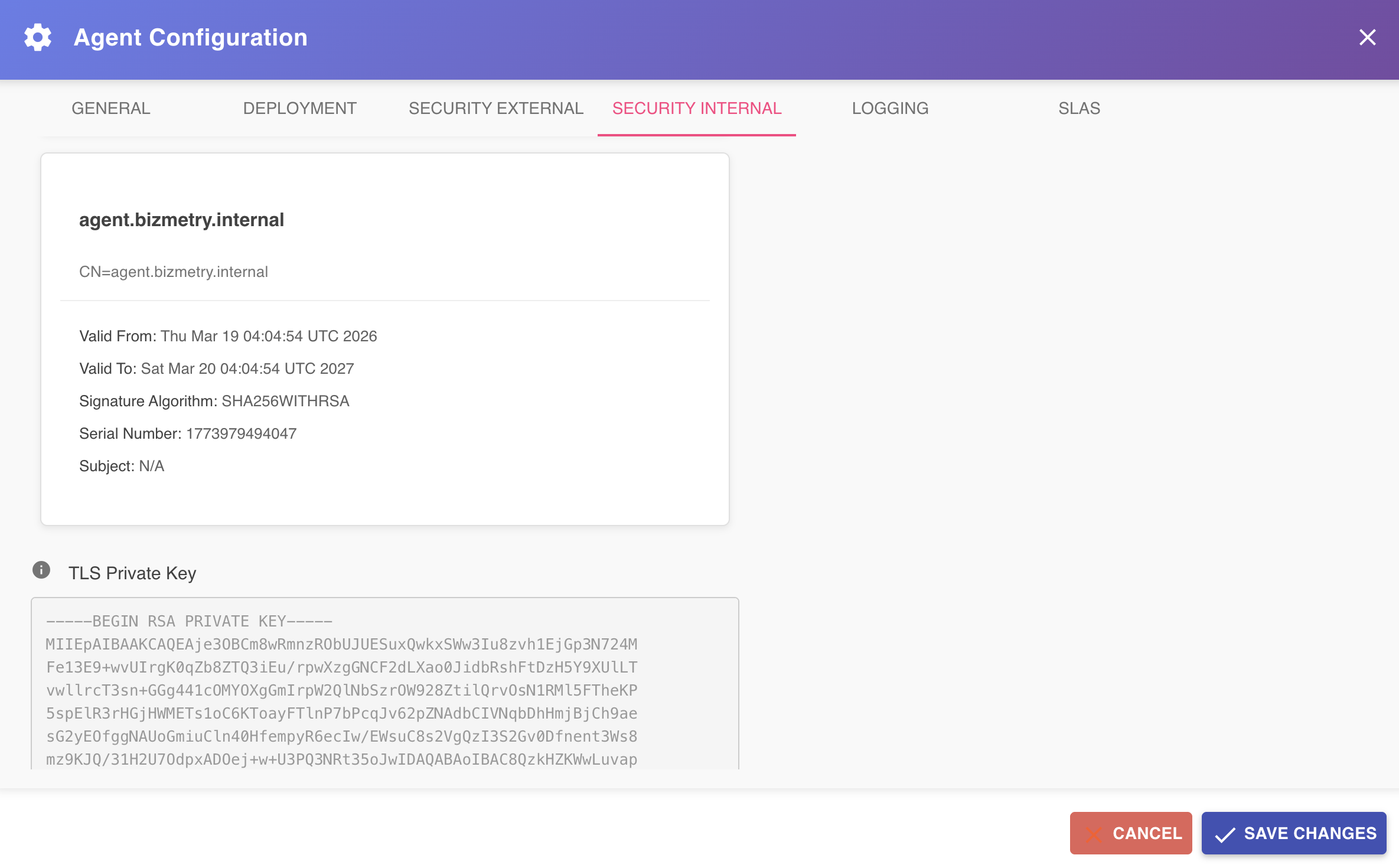
The generated certificate chain is used by the agent installer when provisioning the internal agent ingress — the ingress is configured with a TLS binding that uses this exact key pair to encrypt all inbound traffic from instrumented applications.
Regenerating the key pair invalidates the previous one
If you change the internal gateway address and generate a new key pair, the previous certificate becomes invalid. Any existing agent deployment using the old certificate will need to be redeployed with the new installer to restore secure communication.
Downloading the Certificate Chain
Once the key pair has been generated, the full certificate chain can be downloaded using the Download Certificate Chain button, visible in the TLS Public Certificate Chain section.

Clicking this button downloads the complete chain — including all certificates in the trust path as well as the private key — as a single PEM file to your local machine. This file can be handed off to DevOps for use during agent deployment or for manual ingress configuration if needed.
Configuration Flow Summary
For clarity, here is the recommended sequence for completing the internal security configuration:
- Enable the Internally Exposed toggle.
- Choose the Agent Deployment Topology that matches your deployment.
- If Co-Located Topology — nothing else to do here; skip straight to step 6.
- If Decentralized Topology — select the Ingress Type that matches the cluster's ingress controller, then coordinate with DevOps to provision a private hostname and register it in the internal DNS, and enter that internal gateway URL.
- Click Generate KeyPair, wait for the certificate chain to be populated, and download the PEM file if needed for manual deployment steps.
- Click Save Changes to persist the configuration. Because this tab shapes how the agent is installed, the agent then shows the Redeploy Required indicator: download a fresh installer and reinstall it (../breaking-vs-non-breaking-changes.md)).
- Proceed to download the agent installer, which will embed this configuration automatically.
General Recommendations
Involve DevOps from the start
The only prerequisite that depends on DevOps for the internal configuration is having a private hostname provisioned and registered in the internal DNS. Unlike the external configuration, there is no need to set up TLS certificates on the load balancer side in advance — BizMetry handles key pair generation automatically. However, DevOps must ensure that the ingress load balancer is correctly deployed and reachable at the given address before the agent is installed.
Protecting the internal endpoint
Although the internal endpoint is not exposed to the internet — making it inherently less vulnerable than the external one — it is still accessible from within your private network. A security breach originating from inside the network, such as a compromised host or a lateral movement attack, could potentially reach the agent endpoint.
The agent's built-in security filter mitigates this risk by enforcing authentication and authorization on every inbound request, guaranteeing that:
- The caller belongs to the same account as the agent.
- The caller has sufficient permissions to perform the requested operation.
- The session token presented is valid and has not expired.
This ensures that even if an unauthorized party reaches the internal endpoint, they cannot interact with the agent or access the associated BizMetry account without valid credentials.
Defense in depth applies internally too
For higher-security environments, consider applying network-level controls such as OWASP Top 10 filtering via ModSecurity, internal firewall rules restricting access to known source IPs, or mutual TLS (mTLS) between the SDK/Plugin and the agent ingress. These measures add additional layers of protection against threats originating from within the private network.