Alerting Configuration
The Alerting tab controls how BizMetry notifies users when an SLA breach is detected on a monitored agent. It defines the delivery channels and the list of recipients who will receive breach notifications.
To access this configuration, open the Agent Configuration dialog and select the Alerting tab.

Alerting Sub-System
The master toggle at the top of the tab controls whether the alerting sub-system is active for this agent.
| State | Behavior |
|---|---|
| Enabled | BizMetry will deliver notifications to the configured recipients via the selected channels whenever an SLA breach is triggered or cleared. |
| Disabled | No notifications are sent, regardless of the channel or recipient configuration. SLA breaches are still detected and shown visually on the agent card and Agent Panel, but no alerts are dispatched. |
Relationship with SLA monitoring
The Alerting sub-system only dispatches notifications for metrics that have Alerts Generation enabled in the SLA Configuration tab. Both the metric-level alert toggle and this master switch must be ON for notifications to be delivered.
Notification Channels
Defines how recipients will be notified when a breach alert is triggered or cleared. One or both channels can be selected simultaneously.

| Channel | Description |
|---|---|
| Sends an email notification to each recipient's registered email address. | |
| SMS | Sends an SMS message to each recipient's registered phone number. |
A channel card with a teal border and checked checkbox indicates it is active. Both channels can be enabled at the same time.
Recipient contact data required
SMS notifications require a verified phone number on the recipient's user account. If a recipient has no phone number registered, they will not receive SMS alerts even if the SMS channel is enabled.
Recipients
Defines the list of users who will receive alert notifications through the selected channels.
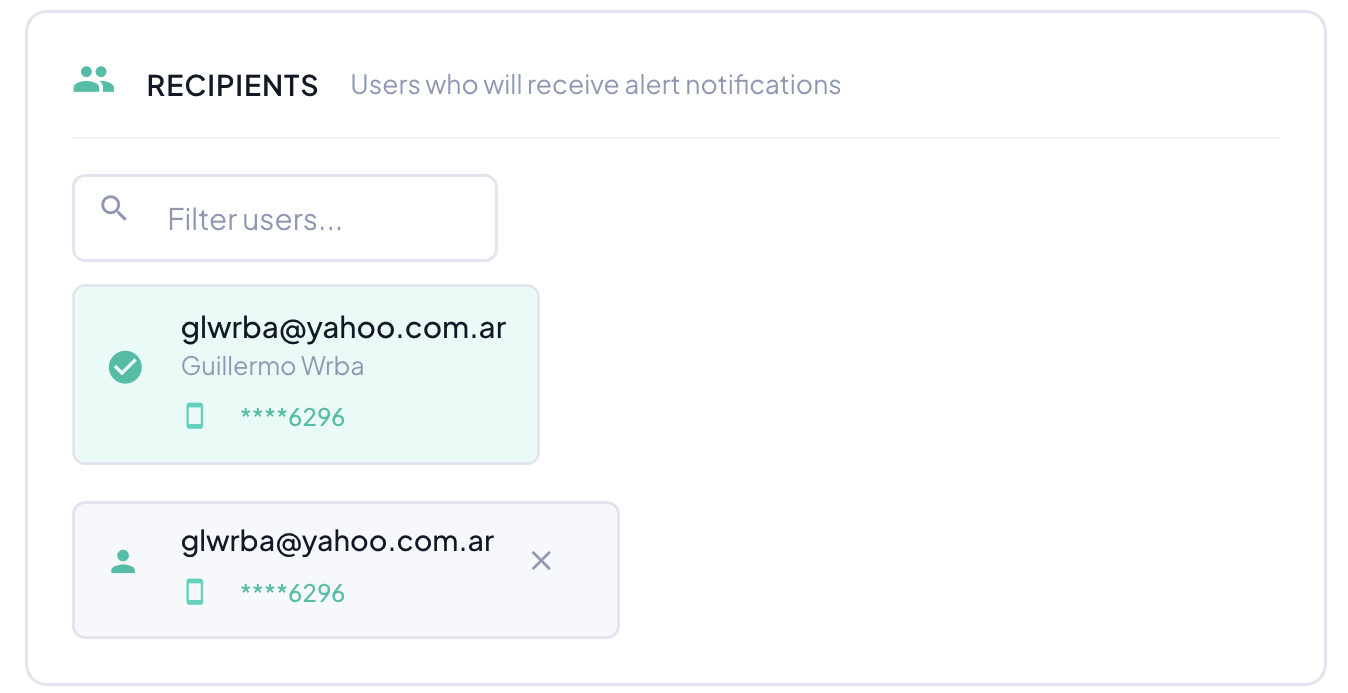
Use the Filter users... search box to find users by name or email. Click a user to add them to the recipient list. Each recipient entry shows:
- Email — the user's login and notification address.
- Name — the user's display name (shown when the user is selected).
- Phone — the masked phone number registered on the account (e.g.
****6296), used for SMS delivery.
To remove a recipient, click the × button on their entry in the selected recipients list.
At least one recipient required
If the alerting sub-system is enabled but no recipients are configured, no notifications will be sent. Always verify the recipient list is populated before saving.