Service Accounts Tab
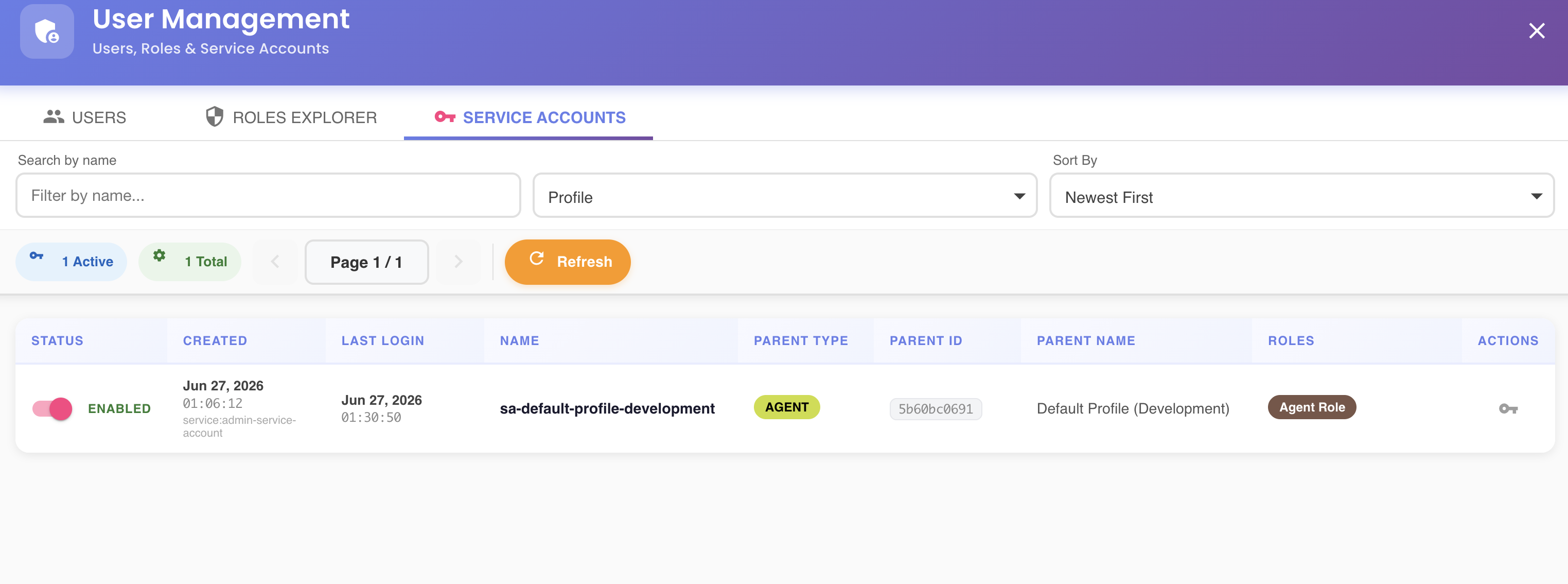
The Service Accounts tab manages programmatic access credentials used by agents, CI/CD pipelines, and external integrations to authenticate against BizMetry APIs without relying on human user credentials.
What Is a Service Account?
A service account is a non-human identity that can be granted roles and permissions within BizMetry. Instead of a password-based login, service accounts authenticate via a Client ID and Client Secret pair, making them suitable for automated processes such as:
- BizMetry agents running in remote environments
- CI/CD pipelines that interact with the BizMetry API
- External integrations that need scoped, auditable access
Each service account is associated with a parent BizMetry object (such as a Profile, Agent, or other platform entity) and can be assigned one or more roles that define what it is allowed to do.
Service Account List
Each row in the list represents one service account and displays the following columns:
| Column | Description |
|---|---|
| Status | Enabled/disabled toggle and state label (ENABLED / DISABLED) |
| Created | Timestamp of when the account was created, plus the identity that created it (e.g. service:admin-service-account) |
| Last Login | Timestamp of the most recent successful authentication |
| Name | The unique identifier name of the service account (e.g. sa-bofa-development) |
| Parent Type | The type of BizMetry object this account is associated with (e.g. AGENT, PROFILE) |
| Parent ID | The truncated ID of the parent object |
| Parent Name | The human-readable name of the parent object (e.g. BoFA (Development)) |
| Roles | Role badges assigned to this account (e.g. Agent Role) |
| Actions | View credentials — opens the credentials modal for this account |
Filtering and Sorting
The toolbar at the top of the tab allows narrowing the list:
| Control | Description |
|---|---|
| Search by name | Free-text filter on the service account name |
| Profile | Dropdown to filter accounts by their parent profile |
| Sort By | Control the sort order (e.g. Newest First) |
Summary Badges and Pagination
Below the filter bar, summary badges show a live count of the current result set — for example 2 Active and 2 Total.
Use the ◀ / ▶ controls next to the page indicator (Page 1 / N) to navigate between pages. The Refresh button reloads the list from the server without leaving the dialog.
Enabling and Disabling a Service Account
Each row has an Enabled toggle. Disabling a service account immediately revokes its ability to authenticate — useful for temporarily suspending automated access or decommissioning an integration. Re-enabling it restores access immediately.
Viewing Credentials
Clicking the icon in the Actions column opens the Service Account Credentials modal for that account.
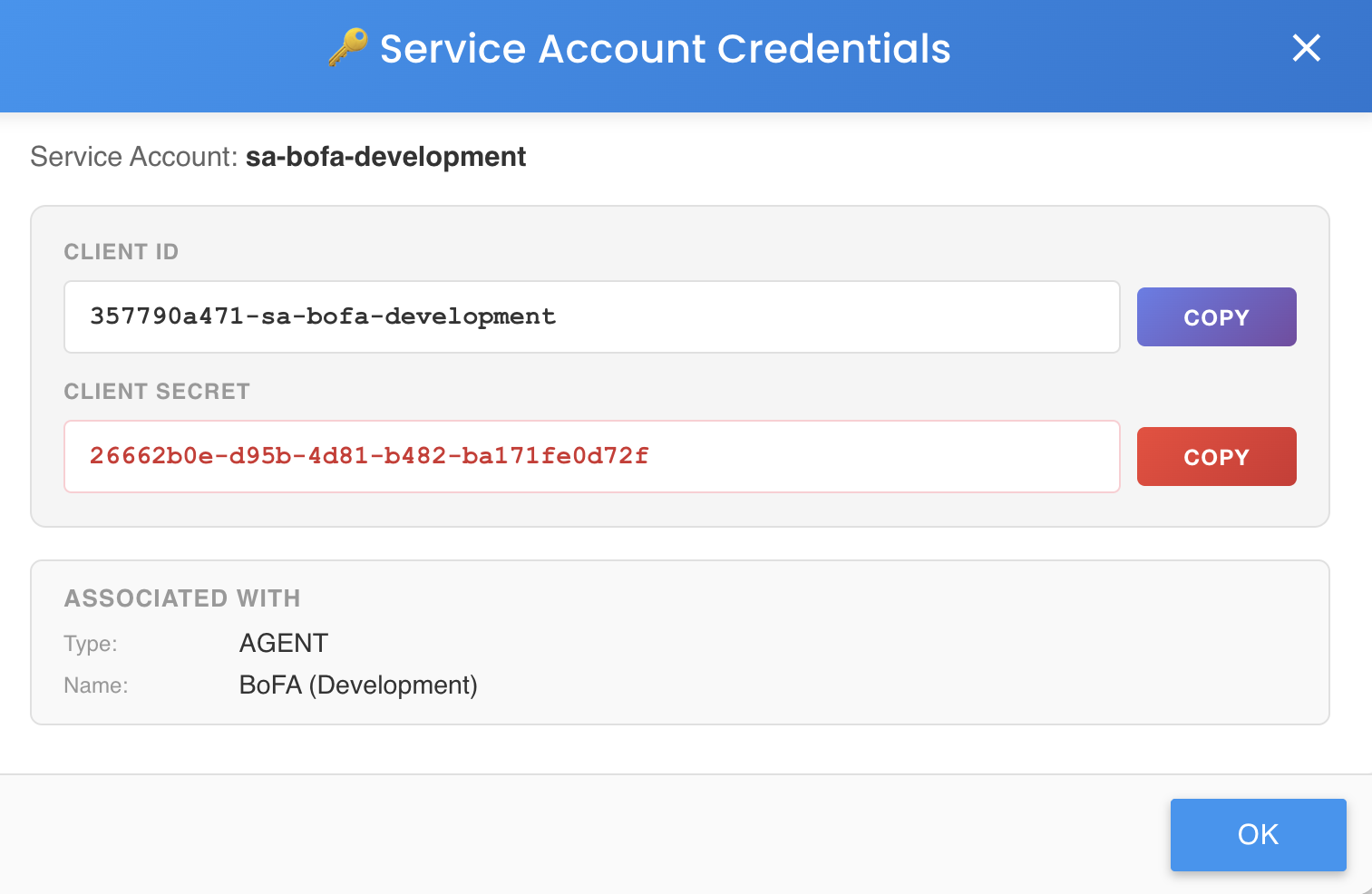
The modal displays:
- Service Account — the name of the service account these credentials belong to.
- Client ID — the public identifier used by the integration to identify itself. Use the COPY button to copy it to the clipboard.
- Client Secret — the secret token used alongside the Client ID to authenticate. Use the COPY button to copy it to the clipboard.
- Associated With — the BizMetry object this account is linked to, showing its Type (e.g.
AGENT) and Name (e.g.BoFA (Development)).
Click OK to close the modal.
Keep the Client Secret secure
The Client Secret grants programmatic access to BizMetry on behalf of the associated object. Treat it like a password — do not share it in logs, version control, or unencrypted storage.