API Collection Lifecycle
Every version of an API Collection goes through a governed lifecycle: it's authored as a draft, reviewed, published for use, and eventually retired. The state of a version decides what you can do with it, and how it can be used by templates and Business Events.
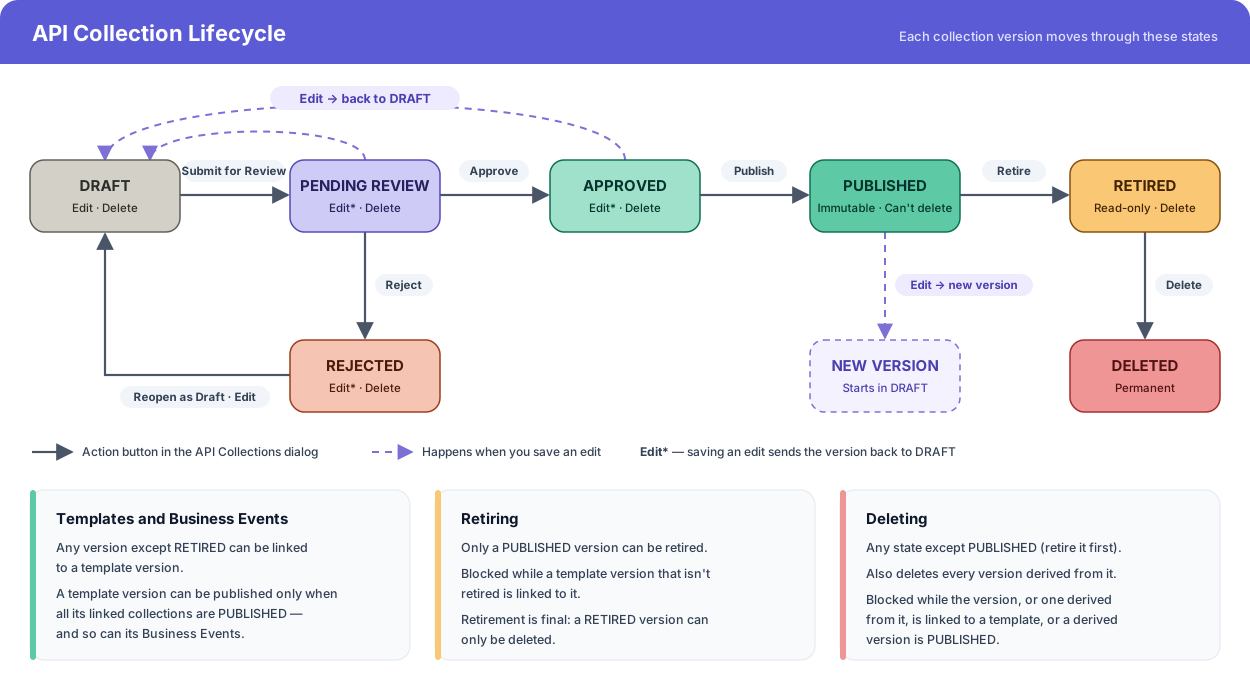
All transitions are manual: you trigger them with the action buttons of each version in the API Collections summary, or by saving an edit. The only exception is editing a PUBLISHED version, which doesn't change its state but creates a new version.
States
DRAFT
The version is being authored. It's the starting state of every new collection, and of every new version created by editing a published one.
| Action | Allowed |
|---|---|
| Edit | Yes, in place |
| Delete | Yes (see Deleting a Version) |
| Link to template | Yes, but the template can't be published until the collection is |
| Next step | Submit for Review → PENDING REVIEW |
PENDING REVIEW
The version was submitted and is waiting for a reviewer's decision.
| Action | Allowed |
|---|---|
| Edit | Yes, but saving sends it back to DRAFT |
| Delete | Yes |
| Link to template | Yes, but the template can't be published until the collection is |
| Next step | Approve → APPROVED, or Reject → REJECTED |
APPROVED
A reviewer accepted the version. It's ready to be published.
| Action | Allowed |
|---|---|
| Edit | Yes, but saving sends it back to DRAFT and it must be reviewed again |
| Delete | Yes |
| Link to template | Yes, but the template can't be published until the collection is |
| Next step | Publish → PUBLISHED |
REJECTED
A reviewer declined the version. It needs changes before it can be submitted again.
| Action | Allowed |
|---|---|
| Edit | Yes, and saving sends it back to DRAFT |
| Delete | Yes |
| Link to template | Yes, but the template can't be published until the collection is |
| Next step | Reopen as Draft → DRAFT |
PUBLISHED
The version is released and immutable: its contract never changes again. This is the state template versions need to be published, and with them the Business Events built on its operations.
| Action | Allowed |
|---|---|
| Edit | Creates a new version in DRAFT; this one stays untouched (see Editing in Each State) |
| Delete | No, retire it first |
| Link to template | Yes |
| Next step | Retire → RETIRED, blocked while a template version that isn't retired is linked to it |
RETIRED
The version is archived. Retirement is final: a retired version can't be reactivated.
| Action | Allowed |
|---|---|
| Edit | No |
| Delete | Yes |
| Link to template | No |
| Next step | Delete removes it permanently |
Transitions
| Action | From | To | Permission |
|---|---|---|---|
| Submit for Review | DRAFT | PENDING REVIEW | Edit Api Collection |
| Approve | PENDING REVIEW | APPROVED | Edit Api Collection |
| Reject | PENDING REVIEW | REJECTED | Edit Api Collection |
| Reopen as Draft | REJECTED | DRAFT | Edit Api Collection |
| Publish | APPROVED | PUBLISHED | Edit Api Collection |
| Retire | PUBLISHED | RETIRED | Edit Api Collection |
| Edit (save) | PENDING REVIEW · APPROVED · REJECTED | DRAFT | Edit Api Collection |
| Edit (save) | PUBLISHED | (unchanged; new version in DRAFT) | Edit Api Collection |
| Delete | Any state except PUBLISHED | (removed) | Delete Api Collection |
Each version shows only the buttons that apply to its state. A blocked action stays visible but disabled, and hovering over it explains why.
Editing in Each State
What saving an edit does depends on the state of the version:
- DRAFT, PENDING REVIEW, APPROVED or REJECTED: the version is updated in place and goes back to DRAFT, so it has to be reviewed again before it can be published. Unpublished Business Events that use a changed operation are recomputed.
- PUBLISHED: the version is never modified. BizMetry creates a new version in DRAFT with your changes, derived from the published one, with a major or minor version bump.
- RETIRED: can't be edited.
See Editing an Existing API Collection for how to update a contract and how the new version number is chosen.
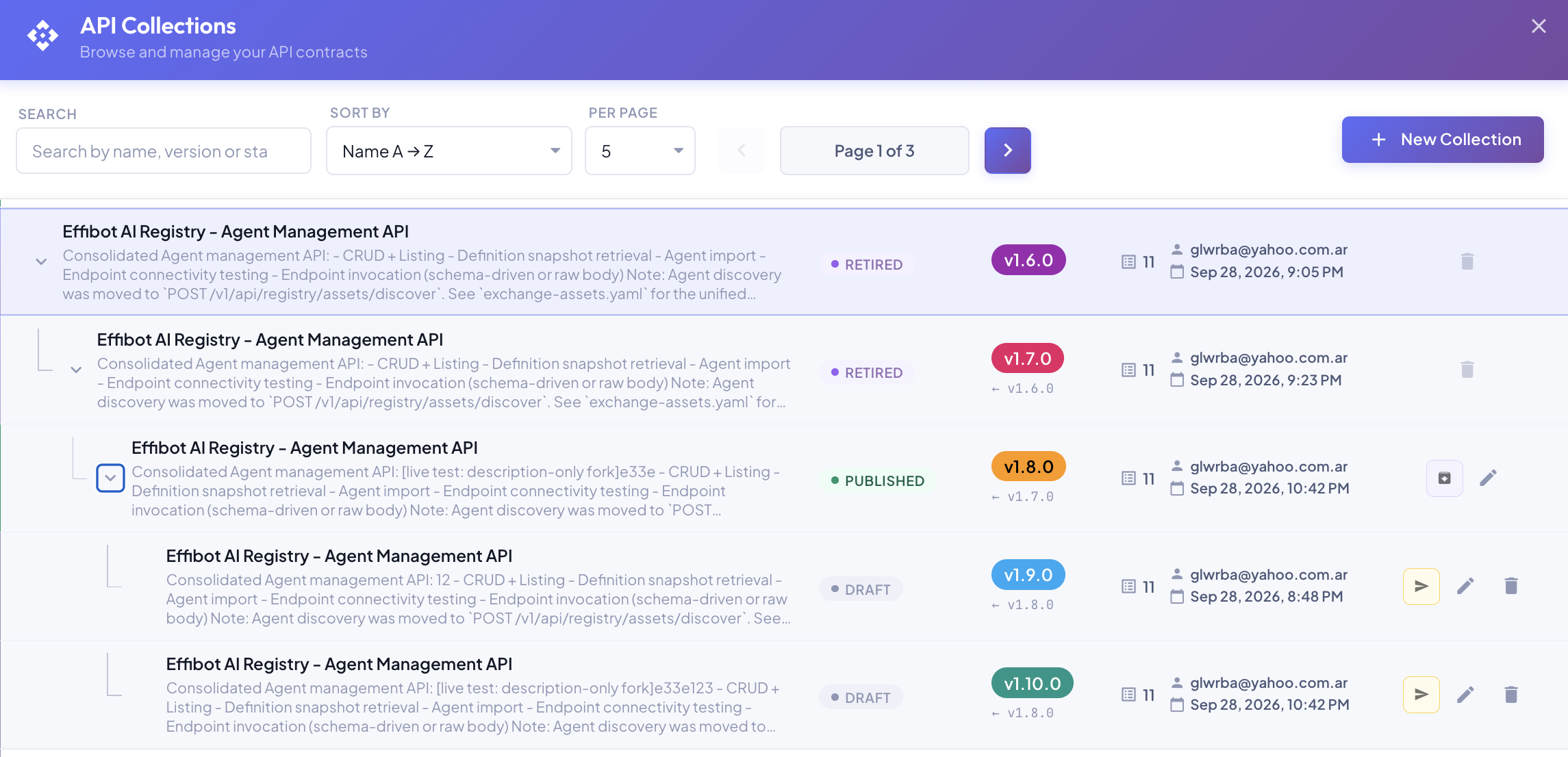
Over time, a collection accumulates versions, each derived from an earlier one, and several of them are usually in use at once, one per application release in each environment. The API Collections dialog shows them as a tree:
Templates and Business Events
API Collections reach Business Events through template versions (see API Collections and Lifecycle Management). The lifecycle of a collection version and the templates it's linked to are tied together:
- Any version except RETIRED can be linked to a template version.
- A template version can be published only when every collection version linked to it is PUBLISHED. Business Events, in turn, can only be published on a published template version, so a published Business Event always relies on published, immutable contracts.
- A version can't be retired while any template version that isn't retired is linked to it.
- A version can't be deleted while it's linked to a template version.
Deleting a Version
Deleting is permanent and can't be undone. It's available in every state except PUBLISHED; a published version must be retired first.
Deleting a version also deletes every version derived from it. For that reason, the delete icon is disabled when the version, or any version derived from it:
- is linked to a template version, or
- is a derived version in PUBLISHED.
Hover over the disabled icon to see which versions block the deletion. See Delete for the two-step confirmation.