Skip to content

Deleting an Account

BizMetry allows root account owners to permanently delete their accounts.
This operation is irreversible and should only be performed by authorized administrators.


⚠️ Pre-Deletion Requirements

Before deleting an account, ensure that: - All profiles and environments have been exported or decommissioned.
- All agents have been deregistered.
- There are no active telemetry uploads in progress.
- All users under the same organization are informed.


🧭 Steps to Delete Your Account

You can initiate account deletion in two different ways:

🔹 Option 1 — Via User Avatar Menu

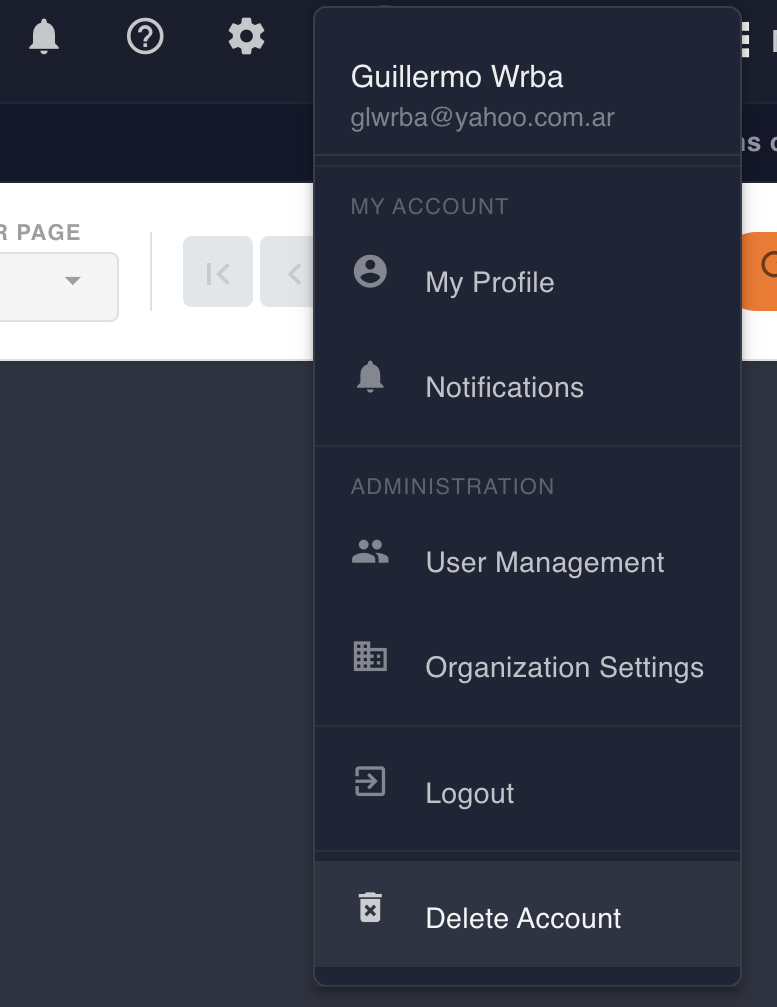
  1. Click on your user avatar in the top-right navigation bar.
  2. Select Account Settings → Delete Account.
  3. Confirm the deletion by entering your password or confirmation token.
  4. Wait for the confirmation message.

🔹 Option 2 — Using the “Delete Account” Button on the Top Navigation Bar

Alternatively, you can delete your account directly by clicking the “Delete Account” button located on the top navigation bar of the Home Screen.
This shortcut provides a faster path to account termination, opening the same confirmation dialog used in the standard deletion process.

🧠 Use this method when you need to quickly remove a root account during administrative cleanup or system testing.

🖼️ Example — Delete Account Confirmation Dialog

The following image shows the Delete Account confirmation dialog that appears after clicking the button:

Delete Account Dialog

💡 You must confirm the operation by entering the text shown on the dialog.
Once confirmed, the system proceeds immediately with deletion.


⚙️ What Happens After Deletion

Once confirmed, BizMetry automatically: - Deletes your account record from the system alongside with all connected artifacts and configurations. - Purges all profiles, telemetry templates, and agent configurations linked to that account.
- Sends a final confirmation email to the registered address.

The deletion cascade ensures that no residual configuration or telemetry data remains in the platform.


🚨 Important

Deleted accounts cannot be restored.
The operation permanently removes all related data, including profiles, templates, and agents.

For compliance reasons, BizMetry may retain anonymized metadata for a limited retention period (e.g., audit or billing traces) but without any identifiable content.