What is a BizMetry Telemetry Frame?
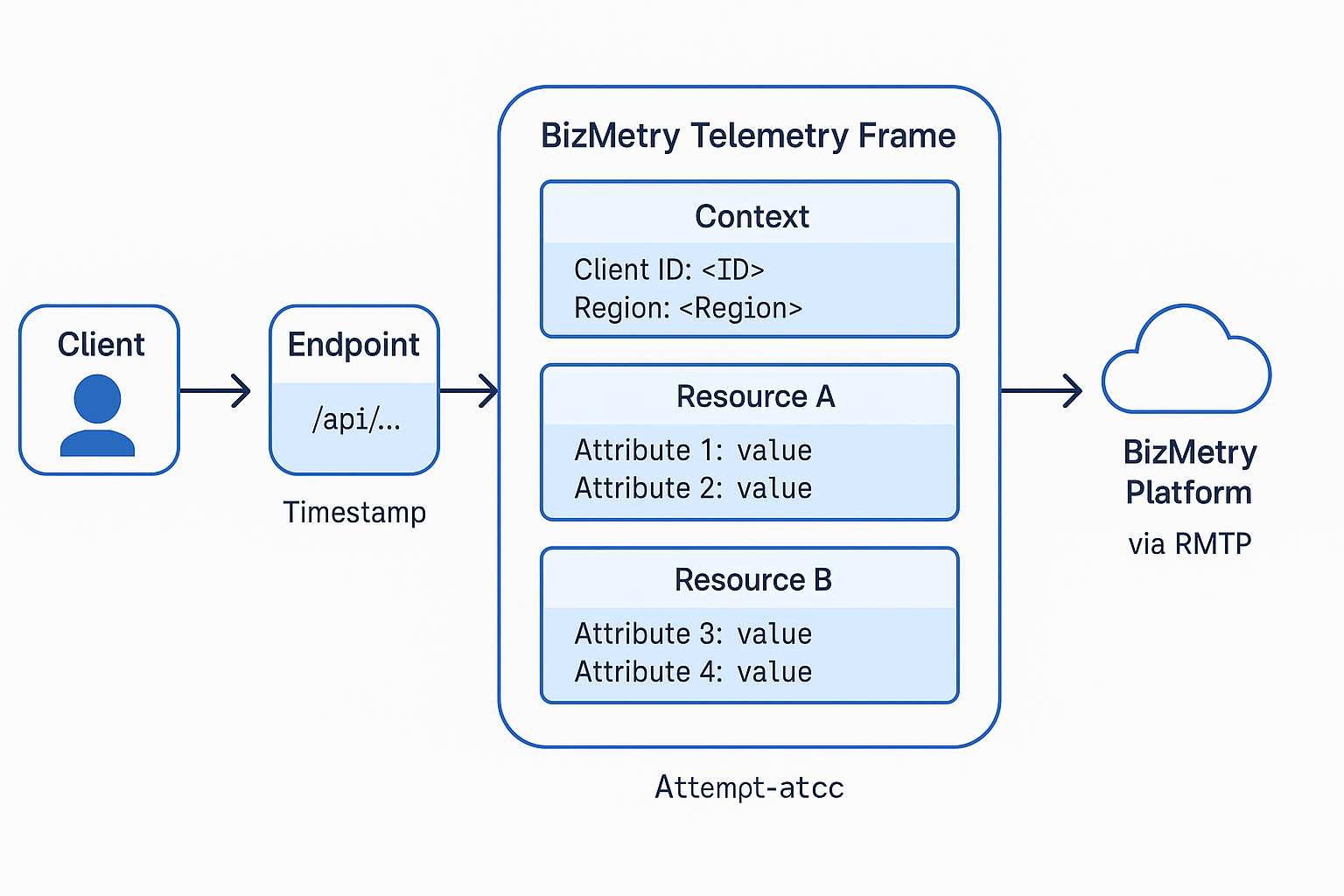
A BizMetry Telemetry Frame is a core abstraction within the BizMetry platform that enables the real-time capture of business telemetry data — representing one or more attributes of one or more resources (ASBOs).
Telemetry frames can be generated either automatically (via instrumentation and interception) or manually (via programmatic SDK calls).
Each frame acts as a data point set that encapsulates the state and context of a business event as it occurs.
Concept Overview
A Telemetry Frame represents a single observability event that BizMetry agents collect, process, and transmit to the central platform.
It contains all relevant data for that event, including which client generated it, what resources and attributes were affected, and what values were observed at that precise moment.
Each frame provides BizMetry with a fine-grained snapshot of business activity in motion, linking technical execution to business outcomes.
Structure of a Telemetry Frame
Every telemetry frame in BizMetry contains the following contextual components:
| Component | Description |
|---|---|
| Timestamp | The precise moment in time when the frame was captured. |
| Client | The origin of the frame — representing the consumer or system invoking a resource. |
| Endpoint | The API or interface where the interception occurred. |
| Resources (ASBOs) | One or more business objects involved in the operation. |
| Attributes | Specific measurable characteristics of those resources (e.g., latency, cost, toxicity score). |
| Attribute Values | The actual numeric or non-numeric readings associated with each attribute. |
| Transactional Context | Metadata such as request ID, region, environment, correlation IDs, etc. |
Self-Contained Representation
In BizMetry, every telemetry frame is a structured, self-contained representation of a business-relevant event or interaction.
Telemetry Frame Types in BizMetry
BizMetry supports the definition of multiple Telemetry Frame Types, each designed to model and capture a specific business scenario, operational context, or domain-level event.
A Frame Type acts as a logical template (or schema) that defines how telemetry should be collected for a given category of business interaction.
It specifies:
- Which resources (ASBOs) are involved
- Which attributes must or may be captured
- What contextual metadata is relevant for interpretation and analysis
In essence, a Frame Type defines the semantic contract for a class of telemetry events.
Business-centric perspective (important clarification)
While a Frame Type is conceptually associated with a business action, this association is not necessarily 1:1.
A single Frame Type may be instantiated by multiple clients or channels, as long as they represent the same logical business intent and require the same telemetry semantics.
Frame Types model business meaning, not execution paths.
One Frame Type, multiple business entry points
For example, in a banking system, you may want to capture telemetry for a Funds Transfer operation with attributes such as:
- Transfer amount
- Currency
- Risk score
- Processing latency
- Outcome (success / failure)
That same transfer can be initiated from multiple channels or platforms, including:
- Mobile banking applications
- Front-desk systems
- Self-service kiosks
- In-person assisted channels
- External or partner platforms
Even though the originating action differs, the business intent and telemetry requirements remain the same.
All these entry points can emit the same Frame Type, enriched with contextual attributes such as channel, platform, or origin.
This enables BizMetry to:
- Aggregate telemetry across heterogeneous channels
- Compare performance, risk, and outcomes by channel
- Preserve a unified, business-level view of the operation
Examples of Telemetry Frame Types
| Frame Type | Purpose | Typical Metrics Captured |
|---|---|---|
| AI Chat Completion Frame | Observes AI model invocations and inference behavior. | Tokens in/out, latency, cost, model drift, bias indicators, toxicity score. |
| Order Transaction Frame | Tracks end-to-end execution of retail or e-commerce orders. | Order value, discount rate, payment latency, fulfillment time, failure rate. |
| Fleet Telemetry Frame | Collects operational metrics from logistics and delivery fleets. | Vehicle speed, fuel consumption, delivery delays, route deviation, geolocation. |
| Healthcare Visit Frame | Monitors patient appointment and care workflows. | Visit duration, waiting time, throughput, satisfaction index. |
| Finance Transaction Frame | Observes financial or banking operations. | Transaction value, response time, exchange rate, risk or fraud score. |
Why Frame Types matter
By introducing Frame Types, BizMetry enables:
- Consistent telemetry semantics across channels, platforms, and applications
- Business-level observability instead of raw metric collection
- Cross-channel aggregation and comparison without losing context
- Extensibility, allowing new entry points without redefining telemetry models
- Clear separation between what happened (business intent) and how it was triggered (execution path)
Frame Types are the foundation that allows BizMetry to translate technical signals into coherent, business-level insights.
Resource and Attribute Mapping
Each Frame Type is mapped to one or more Resources (ASBOs) and Attributes, ensuring metrics are always interpreted within the proper business context.
Frame Types within a Telemetry Template
Within a Telemetry Template, BizMetry supports the definition of multiple Frame Types, each dedicated to capturing different kinds of business interactions or operational scenarios.
Each Frame Type defines exactly which attributes to capture from the various resources that belong to the same template.
This modular approach allows organizations to model complex systems with multiple observability needs while maintaining clear separation of concerns between telemetry domains.
Multiple Frame Types Example
A single Telemetry Template for an AI project may define:
- a
ChatCompletionFramefor token usage, cost, and latency - a
ModelEvaluationFramefor drift and bias metrics - a
DatasetIngestionFramefor ingestion rates and validation errors
Each Frame Type encapsulates a specific subset of KPIs and resource–attribute mappings, keeping telemetry contextualized, efficient, and business-driven.
Telemetry Template Hierarchy Overview
| Level | Description | Example |
|---|---|---|
| Telemetry Template | Root container defining observability rules for a Profile. | AI Observability Template |
| Frame Types | Logical categories of frames capturing business events or KPIs. | ChatCompletionFrame, ModelEvalFrame |
| Resources (ASBOs) | Business objects being monitored within each frame type. | AI Model, Prompt, Dataset, AI Agent |
| Attributes | Individual measurable fields captured from each resource. | TokensUsed, Latency, CostUSD, SimilarityScore |
Refinement Hierarchy
Each level progressively narrows observability scope — from template, to frame types, to resources, and finally to attributes that generate actionable KPIs.
Frame Generation Modes
BizMetry supports two complementary mechanisms for generating telemetry frames:
1. Automatic Instrumentation
BizMetry agents can automatically intercept relevant business operations — such as API calls, database queries, or AI inference requests — without modifying application code.
Frames are generated via auto-instrumentation hooks, minimizing effort and intrusion.
2. Manual Instrumentation (SDK-based)
Developers can manually emit telemetry frames using the BizMetry SDK when greater control or custom business events are required.
Schema Compatibility
Both methods produce frames compatible with BizMetry’s telemetry schema.
Transmission to the Platform
Telemetry frames are transmitted by BizMetry Agents to the central BizMetry Platform using the RMTP (Reliable Metric Transport Protocol).
Each agent:
- Sends frames in batches to reduce overhead
- Automatically retries on failures
- Guarantees ordering and deduplication
Minimum Transmission Unit
The Telemetry Frame is the minimum unit of transmission in BizMetry.
Granularity and Selective Telemetry
Telemetry capture can be enabled or disabled dynamically at multiple levels:
- Profile-level
- Environment-level
- Domain-level
- Type-level (Client, Resource, Attribute)
- Instance-level
This ensures performance efficiency, cost control, and contextual relevance.
Agent Behavior and Performance Control
BizMetry Agents dynamically adapt batch size, frequency, and memory usage based on system load, ensuring telemetry never impacts application performance.
Scalable Observability
This distributed model enables high-fidelity, business-centric observability at scale.
Example – AI Chat Completion Telemetry Frame
| Resource | Captured Attributes |
|---|---|
| Prompt Template | Template ID, Language, Toxicity Score |
| AI Model | Name, Version, Hosting Type, Tokens In/Out, Latency |
| Datasets (RAG) | Dataset Count, Similarity Score |
| AI Agent | Cost (USD), Region, Client ID, Bias Deviation |
Business Transaction Snapshot
This frame represents a complete business transaction snapshot for the AI interaction.
Example — BizMetry Telemetry Frame Structure
Summary
A BizMetry Telemetry Frame is the atomic unit of business observability.
It captures real-time operational data at the intersection of Clients, Resources, and Attributes, enabling structured, actionable insights.
Key characteristics:
- Automatic and manual capture
- Multiple Frame Types per Template
- Reliable RMTP transmission
- Fine-grained configuration
- Load-aware agent behavior