BizMetry Resource Attributes
In BizMetry, Attributes are the measurable properties or dimensions of a business asset (ASBO — Application-Specific Business Object).
They represent key data points that the business wants to monitor, analyze, and track over time because they are directly tied to Business KPIs — the indicators that show how effectively the business is meeting its strategic objectives.
Concept
Each Resource in BizMetry (such as a Customer, Vehicle, AI Model, or Dataset) is composed of one or more Attributes.
These attributes store the values that BizMetry continuously captures through telemetry, providing a real-time view of operational performance and business health.
Smallest Unit of Telemetry
Attributes are the smallest unit of business telemetry — the raw metrics that power BizMetry's observability and analytics.
Business Relevance
Attributes are not just technical fields — they carry business meaning.
They define what to measure, how to measure it, and why it matters.
For example:
- A Fleet Vehicle resource may have attributes like Speed, Fuel Level, Engine Temperature, and Location
- A Bank Account resource may track Balance, Transaction Volume, or Average Monthly Cost
- An AI Model resource may expose attributes such as Latency, Tokens Used, Similarity Score, or Drift Percentage
In all cases, attributes are used to compute KPIs, such as:
- Average Response Time
- Conversion Rate
- Model Accuracy
- Cost per Invocation
- Toxicity or Bias Index
Example: AI Domain and Chat Completion Metrics
Let's consider an AI domain where multiple AI services or LLM endpoints are being monitored via BizMetry.
Within this domain, you might have several Resources such as Prompt Templates, Datasets, AI Models, and Agents.
When these resources interact through a Chat Completion API, BizMetry can capture valuable Attributes for each invocation, including:
| Attribute | Description |
|---|---|
prompt_template_used | The prompt template applied for this interaction. |
model_used | The AI or LLM model used for completion. |
datasets_used | Number of datasets employed for retrieval-augmented generation (RAG). |
tokens_request | Tokens consumed by the request. |
tokens_response | Tokens generated in the response. |
invocation_duration_ms | Total latency of the completion call. |
prompt_toxicity | Measured toxicity level of the input prompt. |
similarity_score | Match score between query and retrieved data. |
cost_usd | Total cost of the invocation in USD. |
bias_score | Difference between expected and actual model response. |
model_hosting_type | Whether the model was self-hosted or externally hosted. |
client_id | Identifier of the client application making the API call. |
region | Geographic location or region of the invocation. |
Attribute Capture in BizMetry
BizMetry provides two complementary telemetry modes to capture attribute values:
1. Auto-Instrumented Telemetry (Just-in-Time)
Using BizMetry's auto-instrumentation framework, attributes can be captured automatically at runtime without modifying application code.
Agents and SDK plugins perform deep introspection into running applications or APIs and collect relevant values in real-time.
2. Manual Telemetry
For custom or domain-specific cases, developers can inject manual telemetry hooks at key execution points.
These hooks explicitly report attribute values (for example, via the BizMetry SDK or API), giving full control over what is measured and when.
Just-in-Time Collection
Both modes support just-in-time collection — ensuring that telemetry data reflects the exact moment an operation occurs.
Data Types Supported
Attributes can store diverse data types, enabling rich semantic modeling of your business assets:
| Type | Description |
|---|---|
| String | Textual values such as names, regions, or status codes. |
| Integer / Float | Numeric values like quantities, rates, or percentages. |
| Boolean | Binary states such as enabled/disabled or success/failure. |
| Enum | Predefined sets of possible values (e.g., ModelType = {LLM, SLM}). |
| JSON / Object | Complex structured data for nested or hierarchical attributes. |
| Timestamp | Temporal measurements for latency, scheduling, or lifecycle tracking. |
| Variant | Flexible field type supporting mixed data content. |
From Attribute to Insight
Once attributes are captured by BizMetry agents:
- They are serialized and shipped to the central BizMetry Platform through the FAST (Fast Agent Service Transport) protocol
- The platform aggregates, processes, and correlates these attributes with profiles, templates, and KPIs
- Results are presented in real-time dashboards, allowing executives and engineers to make data-driven decisions
Business Intelligence Bridge
BizMetry turns raw attribute telemetry into meaningful business insights — bridging the gap between technical observability and business intelligence.
BizMetry Client–Resource–Attribute Context
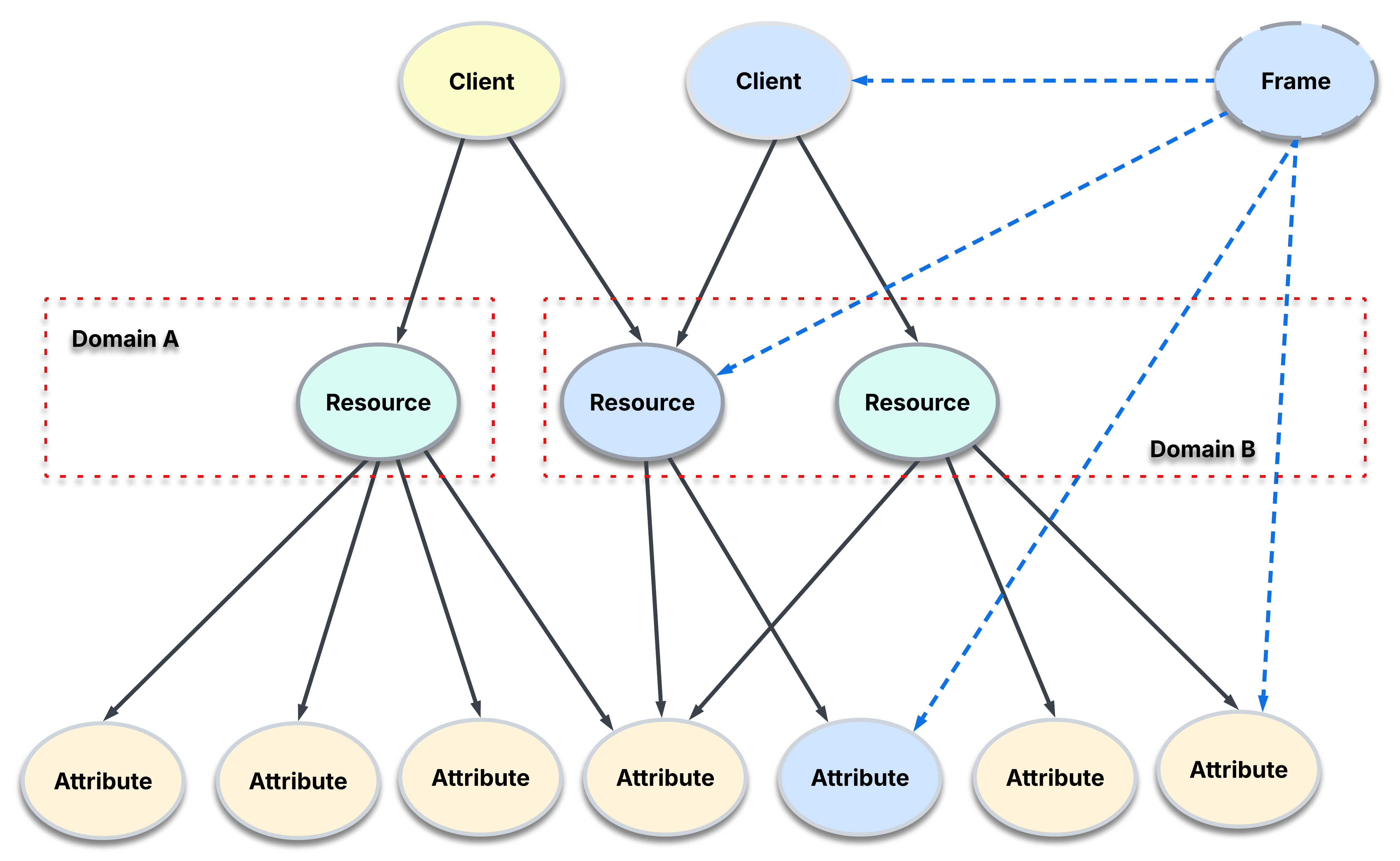
The diagram below illustrates how Clients, Resources, and Attributes interact within the BizMetry Telemetry Framework.
It highlights how clients consume business resources (assets) that, in turn, expose one or more attributes of interest — measurable indicators directly linked to key business KPIs.
Architecture Overview
In BizMetry's architecture:
- A Client represents the consumer (system, app, or agent) invoking or interacting with a business resource
- A Resource represents the business asset (ASBO) being monitored or tracked
- Each Resource exposes one or more Attributes, which are the specific metrics or values the business wants to measure
A Business Telemetry Frame in BizMetry associates these three elements together — capturing the real-time relationship between a Client, a Resource, and its Attributes, providing the foundation for business-centric observability.